Arena Breakout Pass and Package Activation Guide
1
Seleccionar Pass o paquete:
- Elige el Pass o paquete de Arena Breakout que deseas comprar.
- Asegúrate de que la selección corresponde a la cuenta correcta.
2
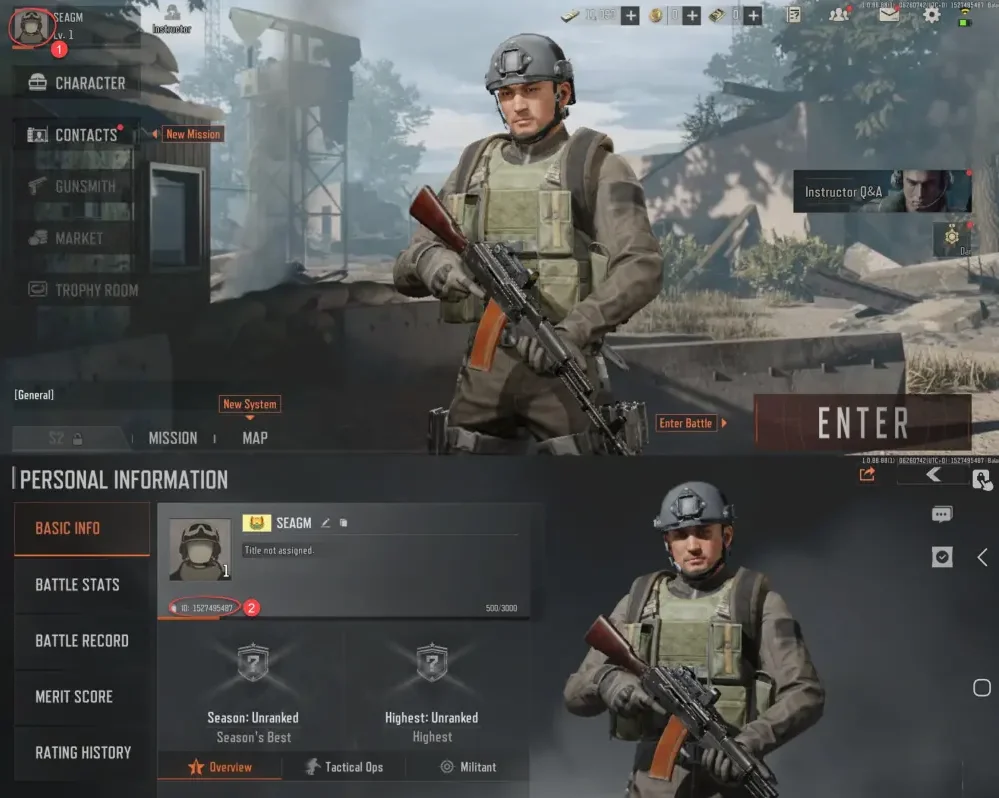
Introducir Player ID:
- Inicia sesión en Arena Breakout.
- Abre el perfil en la esquina superior derecha.
- Tu Player ID aparecerá en el perfil; introdúcelo en el campo requerido.
3
Completar el pago:
- Verifica el Pass o paquete seleccionado y el Player ID.
- Elige el método de pago y confirma el pedido.
4
Recibir el Pass o paquete en el juego:
- Después del pago, el Pass o paquete se añadirá a tu cuenta de Arena Breakout.
- Abre el juego y revisa tu cuenta.