
















































































































Flemings Prime Steakhouse and Wine Bar
1
Connectez-vous à votre compte Flemings Prime Steakhouse and Wine Bar:
- Connectez-vous à votre compte Flemings Prime Steakhouse and Wine Bar sur le site Web ou l'application mobile.
2
Cliquez sur le bouton "Commander":
- Une fois connecté, trouvez et cliquez sur le bouton "Commander" pour commencer votre expérience gastronomique.
3
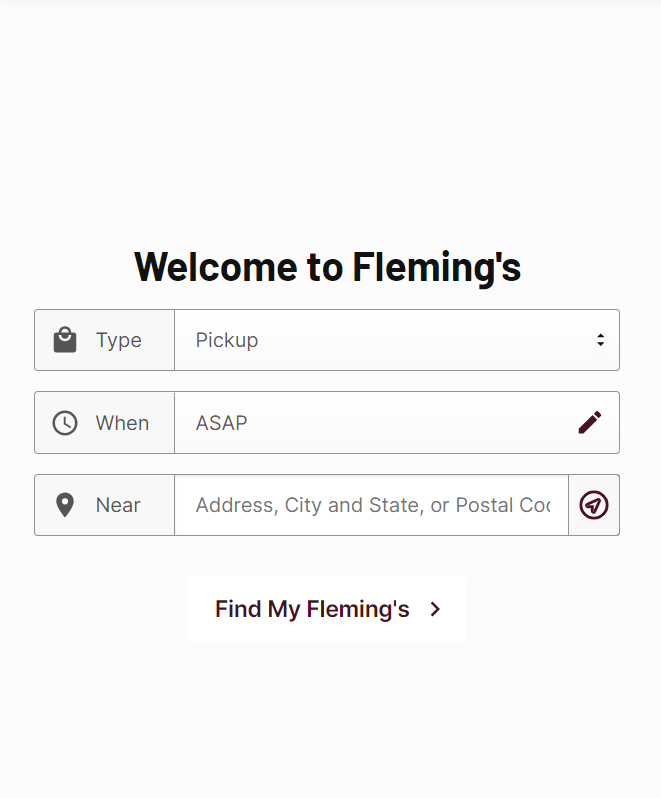
Remplir les informations relatives à la livraison:
- Saisissez les informations nécessaires à la livraison, en veillant à ce qu'elles soient exactes pour que la commande se déroule sans encombre.
4
Choisissez votre plat:
- Parcourez le menu et sélectionnez le plat de votre choix. Cliquez sur "Ajouter au panier" pour l'inclure dans votre commande.
5
Passer à la caisse:
- Cliquez sur l'icône du panier d'achat pour vérifier vos choix, puis passez à la page de paiement.
6
Accéder à la section de paiement:
- Au cours de la procédure de paiement, accédez à la section de paiement pour commencer la procédure de paiement.
7
Sélectionnez le mode de paiement par carte-cadeau:
- Choisissez l'option de paiement par carte-cadeau parmi les méthodes de paiement disponibles.
.png)
8
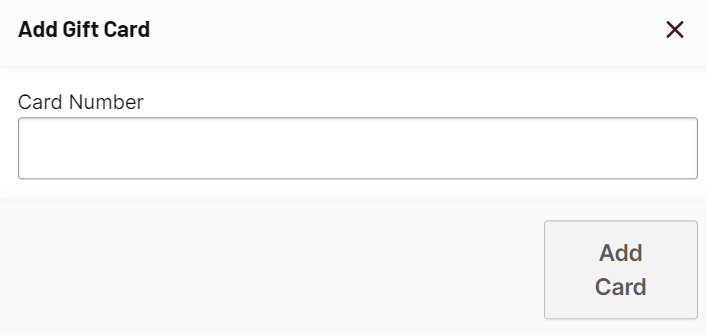
Saisissez et confirmez le code de votre carte-cadeau:
- Saisissez le code de votre carte-cadeau dans le champ prévu à cet effet et confirmez-le pour appliquer le solde à votre commande.
9
Terminez votre commande:
- Terminez la procédure de paiement en suivant les invites restantes pour finaliser votre commande.