Once Human Crystgin Direct Top-Up Activation Guide
1
Choisir Crystgin ou pass:
- Sélectionnez la quantité de Crystgin ou le pass souhaité dans Once Human.
- Vérifiez votre choix avant de continuer.
2
Saisir les informations du compte:
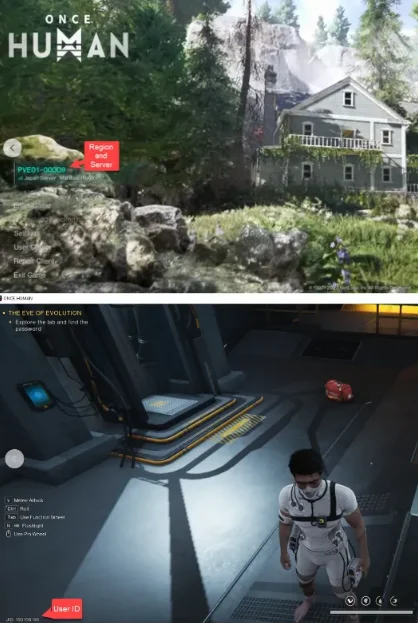
- Entrez correctement votre User ID, Région et Serveur.
- Ouvrez le jeu : la Région et le Serveur sont affichés sur l’écran principal, puis entrez dans le jeu pour voir votre User ID.
3
Finaliser le paiement:
- Accédez au paiement après avoir saisi les informations.
- Choisissez un mode de paiement et confirmez l’achat.
4
Recevoir le contenu:
- Attendez la validation du paiement.
- Le Crystgin ou pass sera ajouté à votre compte rapidement.