Garena Free Fire Diamonds Direct Top-Up Activation Guide
1
Selecciona el paquete de Diamonds:
- Elige la cantidad de Diamonds de Garena Free Fire que quieres comprar entre las denominaciones disponibles.
- Asegúrate de que el paquete de Diamonds seleccionado se ajuste a tu presupuesto y a tus necesidades dentro del juego.
2
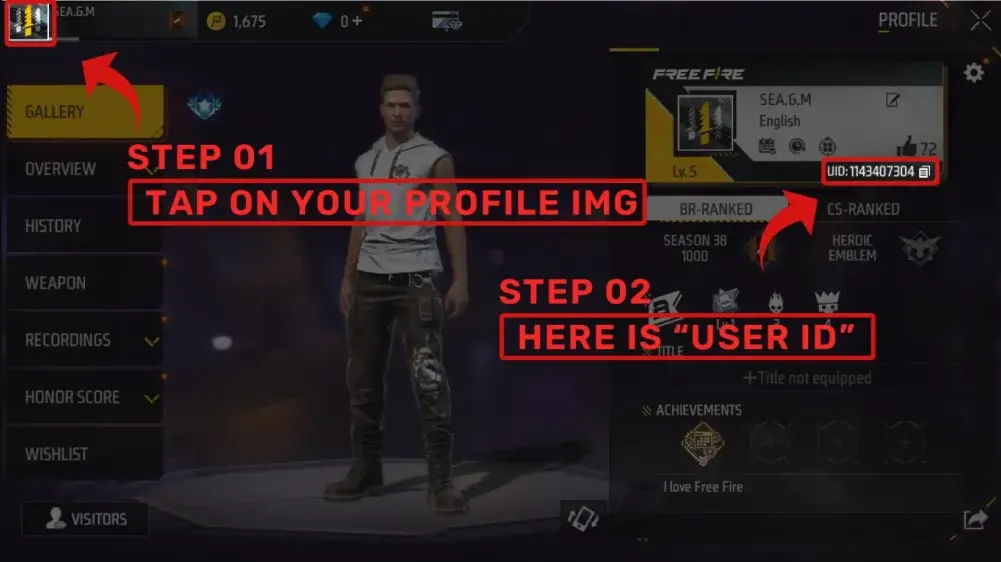
Introduce tu ID de jugador de Free Fire:
- Usa tu cuenta para iniciar sesión en Garena Free Fire.
- Toca tu avatar en la esquina superior izquierda de la pantalla principal para abrir tu perfil.
- Encuentra y anota tu ID de jugador de Free Fire que aparece allí, y luego introdúcela exactamente en el formulario de recarga para evitar retrasos o errores.
3
Confirma el pedido y paga:
- Pasa al checkout después de introducir tu ID de jugador.
- Selecciona tu método de pago preferido (por ejemplo, tarjeta, e-wallet o método de pago local).
- Confirma el pago y espera a que se procese correctamente.
4
Recibe los Diamonds y verifica:
- Una vez completado el pago, los Diamonds de Free Fire comprados se acreditarán en tu cuenta en poco tiempo, incluso si permaneces con la sesión iniciada durante la transacción.
- Vuelve a abrir o actualiza el juego y revisa tu saldo de Diamonds en la pantalla principal.
- Si los Diamonds no llegan después de un tiempo, vuelve a comprobar que usaste el ID de jugador correcto y contacta con el soporte de la tienda si es necesario.