


Monkey King: Arena of Heroes Activation Guide
1
Choisir les vouchers:
- Sélectionnez le voucher souhaité dans Monkey King: Arena of Heroes.
- Vérifiez votre choix avant de continuer.
2
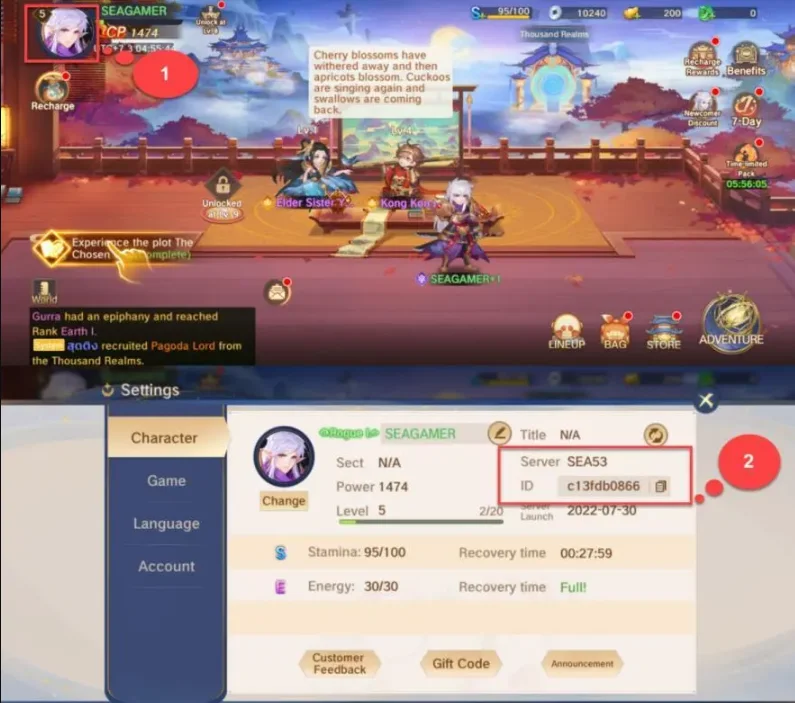
Saisir Character ID et serveur:
- Entrez correctement votre Character ID et serveur.
- Ouvrez le jeu et appuyez sur l’icône Profile en haut à gauche pour afficher ces informations.
3
Finaliser le paiement:
- Accédez au paiement après avoir saisi les informations.
- Choisissez un mode de paiement et confirmez l’achat.
4
Recevoir les vouchers:
- Attendez la validation du paiement.
- Les vouchers seront ajoutés à votre compte rapidement.


