


Heroes Evolved Direct Top-Up Activation Guide
1
Choisir les Token:
- Sélectionnez la quantité de Token dans Heroes Evolved Mobile.
- Vérifiez votre choix avant de continuer.
2
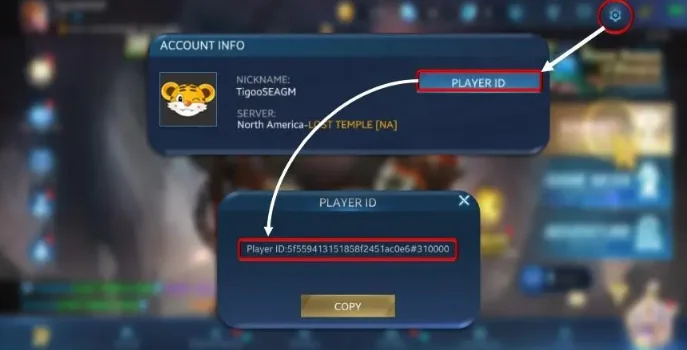
Saisir Player ID et serveur:
- Entrez votre Player ID et choisissez le bon serveur.
- Pour le trouver, connectez-vous au jeu, ouvrez Settings en haut à droite et consultez Player ID dans Account Info.
3
Finaliser le paiement:
- Accédez au paiement après avoir saisi les informations.
- Choisissez un mode de paiement et confirmez l’achat.
4
Recevoir les Token:
- Attendez la validation du paiement.
- Les Token seront ajoutés à votre compte Heroes Evolved Mobile rapidement.


