
















































































































Empik-Geschenkkarte
1
Besuchen Sie Empik und melden Sie sich an:
- Gehen Sie zu Empik.
- Melden Sie sich bei Ihrem Konto an.
2
Produkte auswählen und in den Warenkorb legen:
- Entdecken Sie die verfügbaren Produkte auf der Empik-Website.
3
Artikel zum Warenkorb hinzufügen:
- Wählen Sie die Artikel aus, die Sie kaufen möchten, und legen Sie sie in Ihren Warenkorb.
4
Gehen Sie zur Kasse:
- Sobald Sie alle gewünschten Artikel in Ihren Warenkorb gelegt haben, gehen Sie zur Kasse.
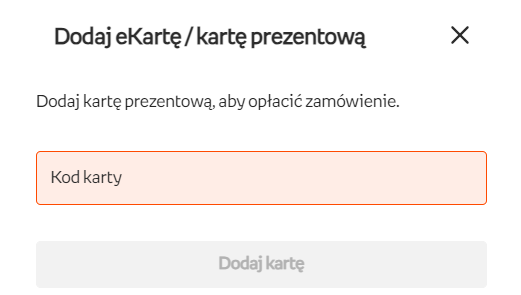
- Wählen Sie während des Bestellvorgangs "e-card" als Zahlungsmethode.
5
Gehen Sie zur Kasse:
- Geben Sie den Code Ihrer Empik-Geschenkkarte in das entsprechende Feld auf der Bezahlseite ein.
6
Wenden Sie den Code an:
- Vergewissern Sie sich, dass der Geschenkkartencode korrekt eingegeben und auf Ihre Bestellung angewendet wurde.
- Folgen Sie den weiteren Anweisungen, um Ihre Bestellung abzuschließen.