Chamet Direct Top-Up Activation Guide
1
Wybierz Diamonds:
- Wybierz pakiet Diamonds, który chcesz kupić.
- Sprawdź swój wybór przed kontynuowaniem.
2
Wprowadź swój User ID:
- Wprowadź swój identyfikator użytkownika Chamet w wymaganym polu.
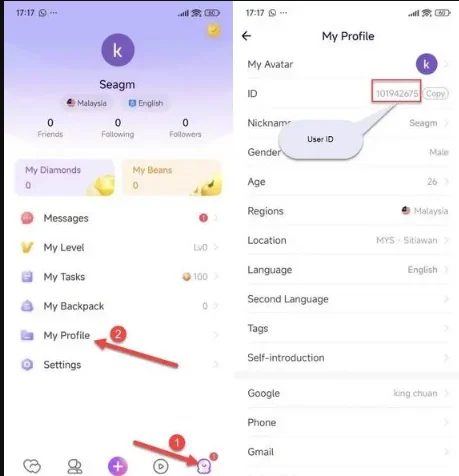
- Aby go znaleźć, zaloguj się do aplikacji Chamet na swoje konto.
- Dotknij ikony Profil w prawym dolnym rogu ekranu głównego, a następnie wybierz Mój profil.
- Twój User ID zostanie wyświetlony na ekranie.
3
Dokończ płatność:
- Przejdź do płatności po wprowadzeniu User ID.
- Wybierz preferowaną metodę płatności i potwierdź zakup.
4
Odbierz Diamonds:
- Po zakończeniu płatności Chamet Diamonds zostaną wkrótce dodane do Twojego konta.
- Sprawdź saldo swojego konta, aby potwierdzić dostawę.