Hero Clash Direct Top-Up Activation Guide
1
Wybierz Red Diamonds:
- Wybierz ilość Red Diamonds w Hero Clash.
- Sprawdź wybór przed przejściem dalej.
2
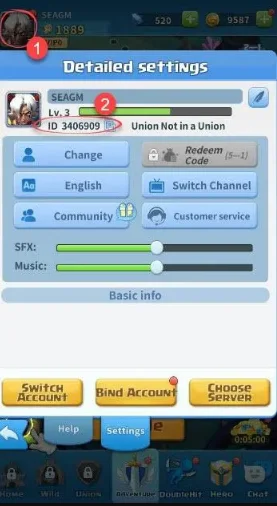
Wprowadź Character ID i serwer:
- Podaj swój Character ID i wybierz odpowiedni serwer.
- Aby go znaleźć, zaloguj się do gry i kliknij ikonę Profile w lewym górnym rogu.
3
Zakończ płatność:
- Przejdź do płatności po wprowadzeniu danych.
- Wybierz metodę płatności i potwierdź zakup.
4
Odbierz Red Diamonds:
- Poczekaj na potwierdzenie płatności.
- Red Diamonds zostaną dodane do Twojego konta w krótkim czasie.