Activation guides

Back

Tower of Saviors Direct Top-Up Activation Guide

1
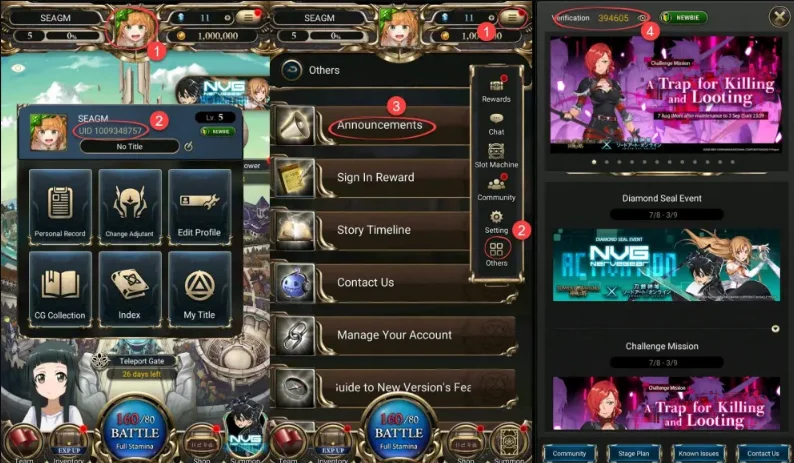
How to top-up Tower of Saviors Diamonds? Select the Diamonds denomination. Enter your UID and Verification Code. Check out and select your payment method. Once payment made, the Diamonds will be added to your Arena of Valor account shortly. How to find Tower of Saviors UID and Verification Code? Use your account to login the game. Tap the Avatar icon in the Upper. Your UID will be displayed. Entering the announcement section, you can find your verification code.
2

Enter Account Details:

  • Enter your UID and Verification Code in the required fields.
  • To find your UID, log in to the game and tap the avatar icon at the top of the screen.
  • To get your Verification Code, open the announcement section in the game.
3

Complete Payment:

  • Proceed to checkout after entering your details.
  • Select your preferred payment method and confirm the purchase.
4

Receive Diamonds:

  • After payment is completed, the Diamonds will be credited to your account shortly.
  • Check your in-game balance to confirm the delivery.
YouTube Premium 12 Months Subscription
-50%
YouTube YouTube
YouTube
GLOBAL
158.99 € 79.99 €
69.59 € with
1x Master Mystery Steam Key
-33%
Steam Steam
Steam
GLOBAL
5.99 € 3.99 €
3.39 € with
Xbox Game Pass Ultimate - 1 Month Non-Stackable
-61%
Microsoft Store Microsoft Store
Microsoft Store
GLOBAL
26.99 € 10.59 €
9.00 € with
EA SPORTS FC 26 (PC)
-98%
Steam Account Steam Account
Steam Account
GLOBAL
69.99 € 1.66 €
1.41 € with
Forza Horizon 6 Standard Edition (PC/ Xbox Series X|S)
-27%
Microsoft Store Microsoft Store
Microsoft Store
GLOBAL
69.99 € 50.79 €
44.19 € with
Gothic 1 Remake (PC)
-44%
Steam Steam
Steam
GLOBAL
49.99 € 28.18 €
23.95 € with