YoYo Activation Guide
1
Wybierz nominał Coin:
- Wybierz żądany nominał Coin.
2
Wprowadź swój identyfikator użytkownika:
- Wprowadź swój identyfikator użytkownika YoHo: Group Voice Chat Room.
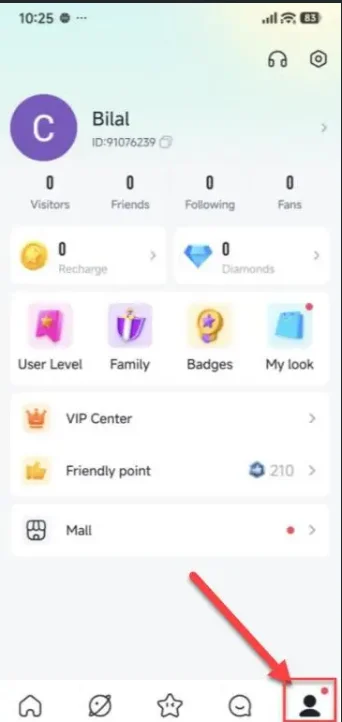
- Aby znaleźć swój identyfikator użytkownika, zaloguj się na swoje konto YoHo: Group Voice Chat Room i dotknij "Profile Icon" w prawym dolnym rogu. Twój identyfikator gracza będzie wyświetlany na tej stronie.
3
Dokonaj płatności:
- Przejdź do kasy i wybierz preferowaną metodę płatności.
- Dokonaj płatności za wybrany nominał Coin.
4
Odbierz swój Coin:
- Po dokonaniu płatności Coin zostanie wkrótce dodany do Twojego konta.