Asphalt 9: Legends Activation Guide
1
Seleziona la quantità di Tokens:
- Scegli il pacchetto Tokens per Asphalt 9 Legends.
- Assicurati che la selezione sia per l’account e la piattaforma corretti.
2
Inserisci Player ID e piattaforma:
- Accedi a Asphalt 9 Legends.
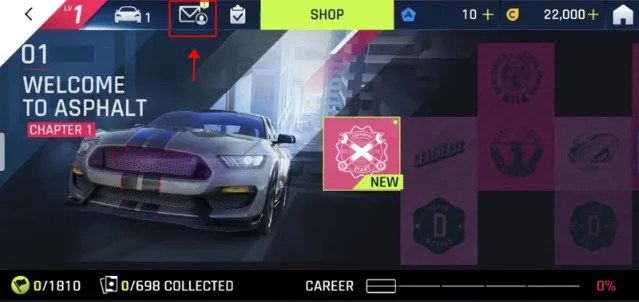
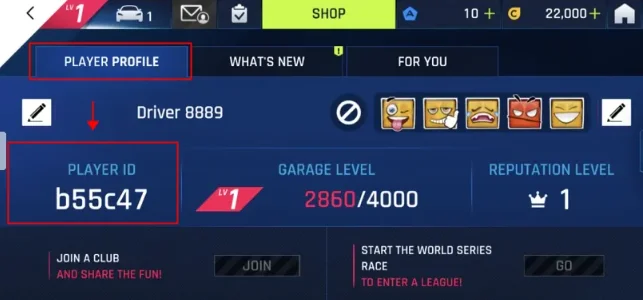
- Apri il profilo giocatore dall’icona in alto.
- Il Player ID è visibile nel profilo, inseriscilo insieme alla piattaforma.
3
Completa il pagamento:
- Controlla il pacchetto Tokens, Player ID e piattaforma.
- Scegli il metodo di pagamento e conferma l’ordine.
4
Ricevi Tokens nel gioco:
- Dopo il pagamento, i Tokens verranno accreditati sul tuo account Asphalt 9 Legends.
- Apri il gioco e verifica il saldo.