













































































Piggy GO Direct Top-Up Activation Guide
1
Select Diamonds:
- Choose the Diamond amount you want to purchase for Piggy GO.
- Confirm your selection before proceeding.
2
Enter UID:
- Enter your Piggy GO UID to continue.
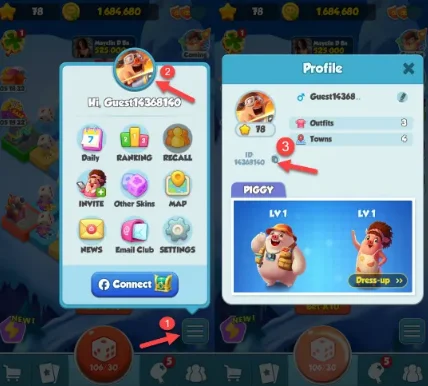
- To find your UID, log in to the game, tap Settings in the bottom-right corner, then open the Profile section.
- Your UID will be displayed there.
3
Complete Payment:
- Proceed to checkout after entering your UID.
- Select your payment method and confirm the purchase.
4
Receive Diamonds:
- After payment is completed, the Diamonds will be credited to your Piggy GO account.
- Delivery usually takes a short time.