Dragonheir: Silent Gods Direct Top-Up Activation Guide
1
Selectează Dragon Crystals:
- Alege pachetul Dragon Crystal pentru Dragonheir: Silent Gods pe care dorești să îl achiziționezi.
- Verifică selecția înainte de a continua.
2
Introdu Player ID:
- Introdu Player ID-ul tău pentru Dragonheir: Silent Gods în câmpul necesar.
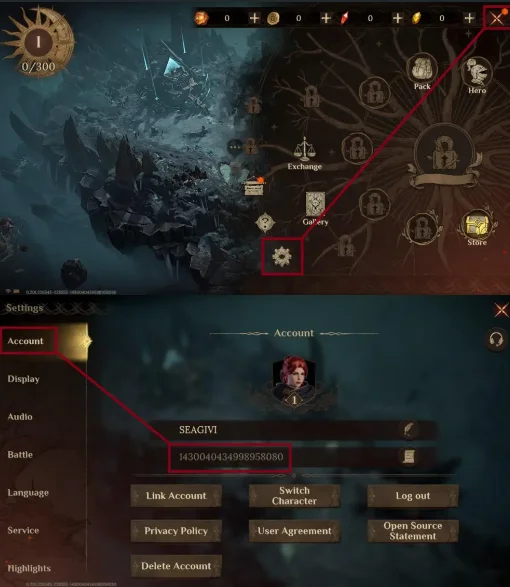
- Pentru a găsi Player ID-ul, conectează-te la joc folosind contul tău.
- Apasă pe Meniul jocului din colțul dreapta sus al ecranului.
- Selectează Setări joc.
- Player ID-ul tău va fi afișat în secțiunea Cont.
3
Finalizează plata:
- Continuă către finalizarea comenzii după introducerea Player ID-ului.
- Selectează metoda de plată preferată și finalizează plata.
4
Primește Dragon Crystals:
- După finalizarea plății, Dragon Crystals vor fi adăugate în contul tău Dragonheir: Silent Gods în scurt timp.
- Verifică soldul din joc pentru a confirma livrarea.