Destiny: Rising Direct Top-Up Activation Guide
1
Seleziona l’importo:
- Scegli la quantità di Silver da acquistare.
- Controlla la selezione prima di procedere.
2
Inserisci i dati dell’account:
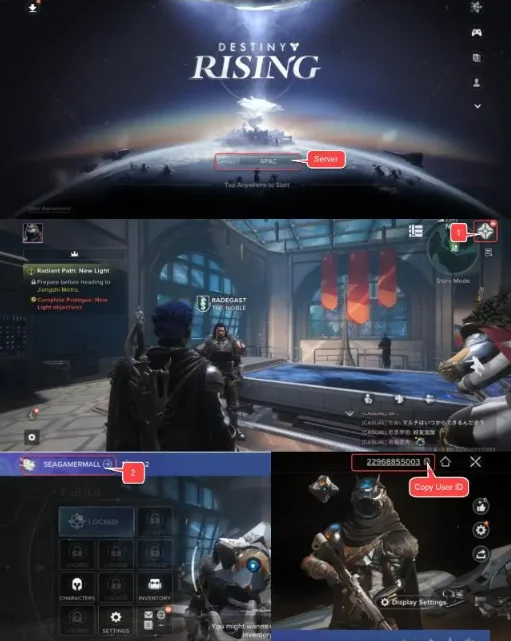
- Inserisci il tuo User ID e seleziona il server corretto.
- Accedi al gioco per vedere il server nella schermata di accesso.
- Apri il menu in alto a destra e vai su Profile per visualizzare il tuo User ID.
3
Completa il pagamento:
- Procedi al pagamento dopo aver inserito i dati.
- Scegli il metodo di pagamento e conferma la transazione.
4
Ricevi il Silver:
- Dopo il pagamento, il Silver verrà aggiunto al tuo account.
- L’elaborazione è generalmente rapida.