


Mobile Legends: Adventure Activation Guide
1
Seleccionar la cantidad de M-Cash:
- Elige la cantidad de M-Cash para Mobile Legends: Adventure.
- Asegúrate de que la selección corresponde a la cuenta correcta.
2
Introducir Account ID y servidor:
- Inicia sesión en Mobile Legends: Adventure.
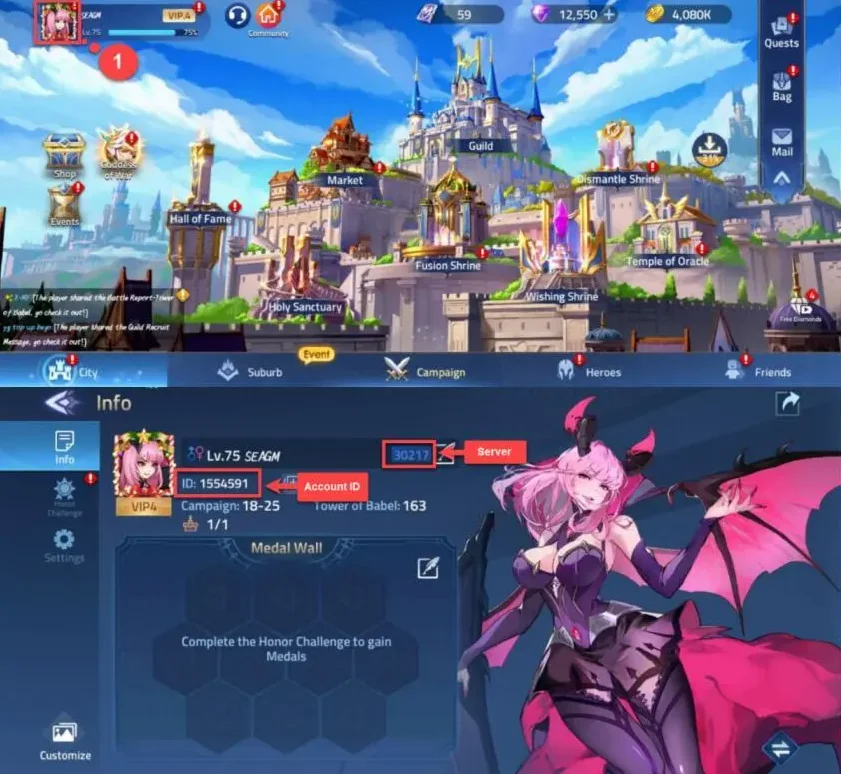
- Toca el icono de perfil en la esquina superior izquierda.
- El Account ID y el servidor se muestran en el perfil; introdúcelos correctamente.
3
Completar el pago:
- Verifica la cantidad de M-Cash y los datos de Account ID y servidor.
- Elige el método de pago y confirma el pedido.
4
Recibir M-Cash en el juego:
- Después del pago, el M-Cash se añadirá a tu cuenta de Mobile Legends: Adventure.
- Abre el juego y revisa el saldo.


