


Puzzles & Survival Direct Top-Up Activation Guide
1
Seleccionar Voucher:
- Elige la cantidad de Voucher que deseas comprar en Puzzles & Survival.
- Verifica la selección antes de continuar.
2
Ingresar datos de la cuenta:
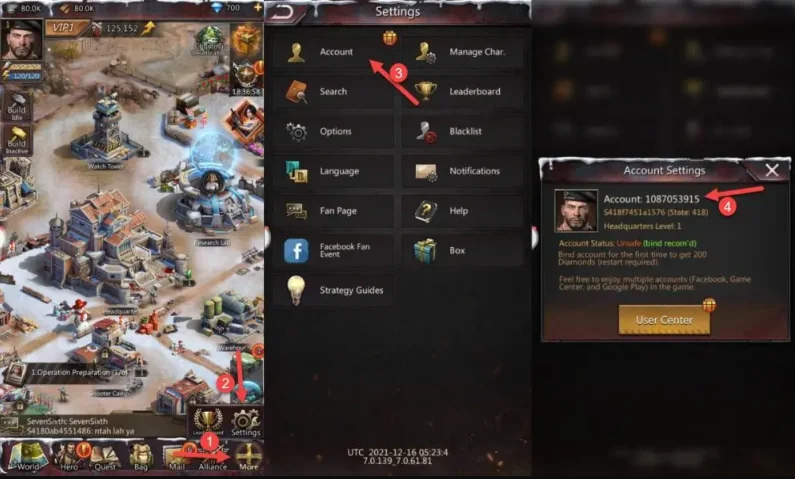
- Introduce tu Account ID, Character Name y selecciona el servidor correcto.
- Para encontrar el Account ID, inicia sesión, toca More en la esquina inferior derecha y abre Settings y Account.
- Asegúrate de que los datos sean correctos.
3
Completar el pago:
- Accede al pago después de ingresar los datos.
- Selecciona un método de pago y confirma la compra.
4
Recibir y usar Voucher:
- Tras el pago, los Voucher se enviarán a tu buzón dentro del juego.
- Ábrelo para recogerlos y utilízalos en el Voucher Mall.
- Los Voucher usados contarán para tu total de recarga.


