Cont Steam vs cheie Steam: ce înseamnă și când să alegi fiecare variantă


 Steam Account
 Steam Account
 Steam Account
 Steam Account
 Steam Account
 Steam Account
 Steam Account
Ce este un cont Steam?
Un produs de tip cont Steam îți oferă acces la un cont Steam separat, pe care jocul este deja asociat.
Nu revendici niciun cod. Te conectezi la contul furnizat, îl securizezi și joci de pe acel cont.
Acest lucru contează, deoarece schimbă modul în care folosești produsul. Jocul nu va fi adăugat în biblioteca ta personală Steam, cu excepția cazului în care produsul este vândut în mod explicit ca cheie Steam.
Este sigur?
Răspunsul scurt este: da, este sigur. Conturile Steam vândute pe Gameseal sunt verificate și gata de utilizare. Jocul se află deja pe cont, așa că nu trebuie să treci prin niciun proces de activare. Primești datele de autentificare imediat după achiziție, te conectezi și poți începe să joci. Dacă ceva nu este clar sau ai întrebări în orice etapă, echipa noastră de suport este disponibilă să te ajute.
Cont Steam vs cheie Steam: care este diferența?
| Caracteristică | Cont Steam | Cheie Steam |
|---|---|---|
| Ce primești | Date de autentificare pentru un cont care include jocul | Cod digital de activare |
| Unde apare jocul | Pe contul Steam furnizat | Pe propriul tău cont Steam |
| Activare | Te autentifici și securizezi contul | Revendici codul pe Steam |
| Potrivit pentru | Jucători care acceptă un cont separat | Jucători care își construiesc biblioteca principală |
| Risc principal | ESTE POSIBIL SĂ NU SUPORTE FUNCȚIA FAMILY SHARE | Regiune sau ediție greșită |
| Preț | Reduceri de până la 90% | De obicei, aproximativ 50% sau similar față de prețul de listă de pe Steam |
Pentru majoritatea jucătorilor, o cheie Steam este opțiunea mai simplă. Jocul, realizările, timpul de joc și capturile de ecran rămân pe profilul tău principal.
Un cont Steam poate fi totuși util dacă prețul este atractiv și te interesează doar să joci acel titlu anume.
Descoperă ofertele pentru conturi Steam pe Gameseal - adesea cu 30-50% mai ieftine decât cheile standard.
Când merită să cumperi un cont Steam?
Un cont Steam poate avea sens dacă:
- vrei acces la un anumit joc pentru PC,
- ești de acord să folosești un cont Steam separat,
- nu ai nevoie ca jocul să fie în biblioteca ta principală,
- oferta este clar mai ieftină sau mai convenabilă pentru tine,
- înțelegi procesul de activare înainte de achiziție.
De obicei, nu este cea mai bună alegere dacă:
- colecționezi jocuri pe un singur profil Steam,
- îți pasă de realizări și de timpul de joc pe contul principal,
- cumperi un cadou pentru cineva care se așteaptă la o cheie Steam standard,
- nu vrei să gestionezi date de autentificare suplimentare.
Înainte de achiziție, verifică atent eticheta produsului. Contul Steam, cheia Steam și cadoul Steam sunt tipuri diferite de produse.
Cum funcționează activarea unui cont Steam?
1. Deschideți linkul de activare:
- Faceți clic pe linkul de activare pe care l-ați primit de la vânzător. Veți fi redirecționat către pagina de activare.

2. Finalizați activarea:
- Odată ce activarea a fost efectuată cu succes, veți vedea o pagină de confirmare. Detaliile contului dvs. vor fi trimise și la adresa de e-mail pe care ați furnizat-o.
3. Conectați-vă la noul cont Steam:
- Utilizați datele de conectare și parola furnizate pentru a accesa noul dvs. cont Steam.
4. Modificați datele de conectare și parola (opțional):
- Dacă doriți să modificați numele de utilizator sau parola, faceți clic pe butonul „Modificați adresa de e-mail și parola contului“ și urmați instrucțiunile furnizate.

Cum să folosești contul tău Steam? Ghid pas cu pas
Pasul 1: Verifică contul activ
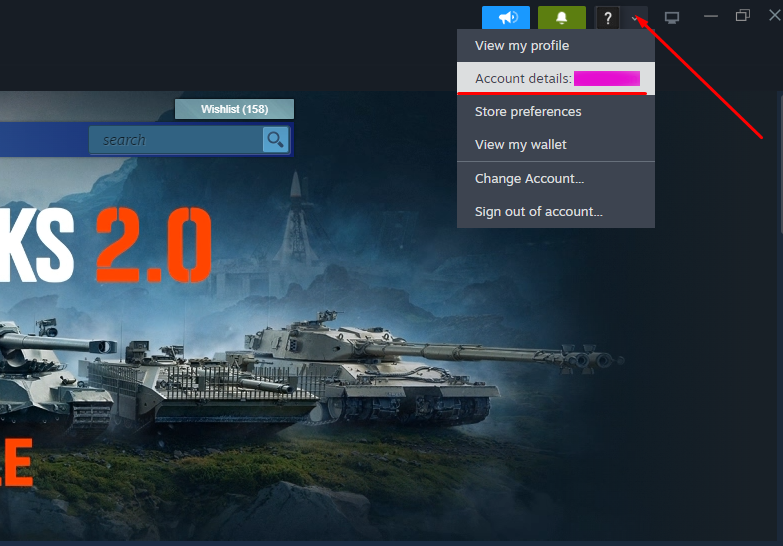
Contul selectat este afişat în zona marcată în imaginea de mai sus.
Pasul 2: Extinde meniul
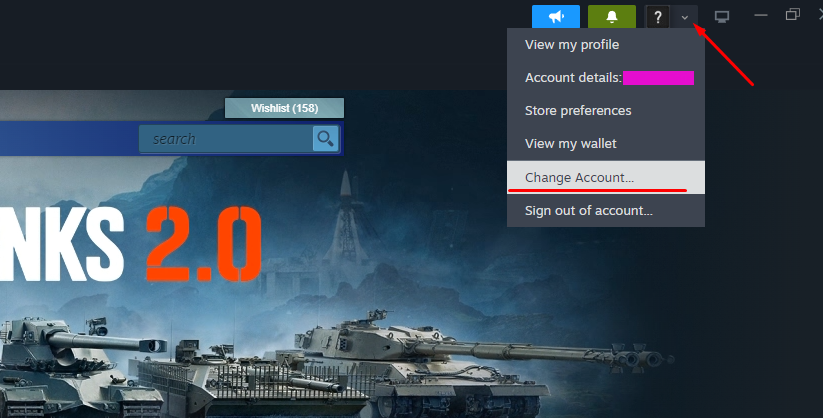
Apasă pe pictograma din colțul din dreapta sus şi alege "Schimbă contul".
Pasul 3: Confirmă schimbarea
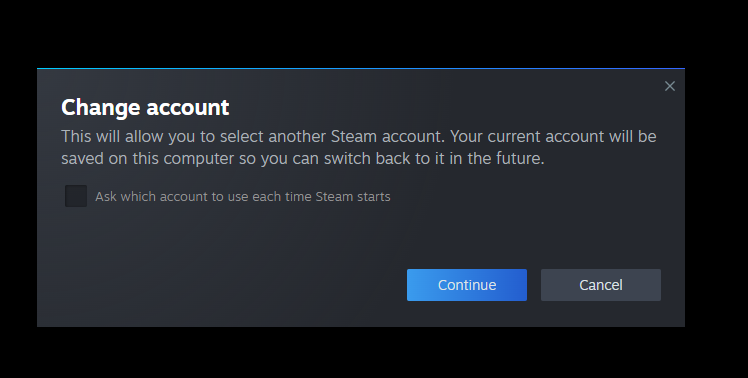
Apasă pe "Continuați" pentru a continua.
Pasul 4: Conectează-te la alt cont
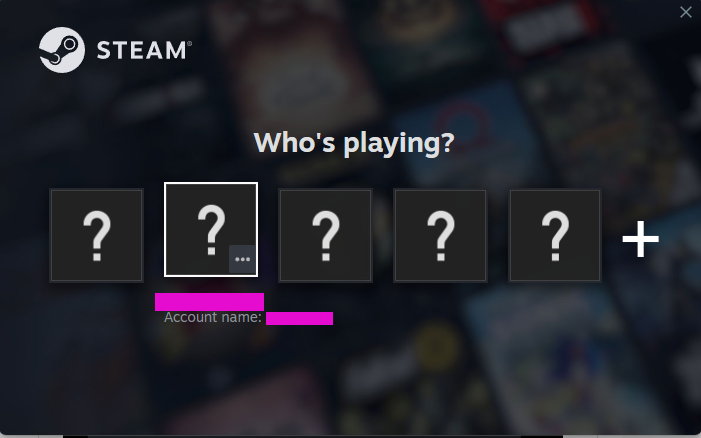
Steam îți va permite să adaugi un cont nou, facilitând trecerea între conturi.
Recomandare finală: cont Steam sau cheie Steam?
Alege o cheie Steam dacă vrei un cod de activare obișnuit și jocul în propria ta bibliotecă Steam.
Alege un cont Steam dacă înțelegi că jocul rămâne pe un cont separat, iar oferta are în continuare sens pentru modul tău de utilizare.
Pentru majoritatea utilizatorilor noi, cheia Steam este alegerea implicită mai sigură. Pentru jucătorii orientați spre preț, care citesc cu atenție detaliile produsului, un cont Steam poate fi o alternativă utilă.
Verifică ofertele pentru conturi Steam și chei Steam pe Gameseal, apoi alege versiunea care se potrivește platformei, regiunii și stilului tău de joc.
FAQ
Ce este un cont Steam?
Un cont Steam este un produs prin care primești acces la un cont Steam care include deja jocul.
Este un cont Steam același lucru cu o cheie Steam?
Nu. O cheie Steam este un cod revendicat pe propriul tău profil Steam. Un cont Steam folosește un cont separat pe care jocul este deja asociat.
Pot adăuga jocul în biblioteca mea principală Steam?
De obicei, nu. Jocul rămâne pe contul furnizat. Alege o cheie Steam dacă vrei să îl ai pe profilul tău principal.
Este sigur să folosești un cont Steam?
Depinde dacă urmezi instrucțiunile și securizezi corect contul. După autentificare, schimbă adresa de e-mail, parola și activează Steam Guard.
Ar trebui să cumpăr un cont Steam sau o cheie Steam?
Cumpără o cheie Steam dacă vrei cea mai simplă experiență. Cumpără un cont Steam doar dacă accepți să folosești un cont separat pentru acel joc.
Ce înseamnă GLOBAL?
GLOBAL înseamnă, de obicei, acces regional extins, dar ar trebui să verifici totuși pagina produsului. Unele produse pot avea excluderi.
Pot cumpăra un cont Steam cadou?
Pentru un cadou, o cheie Steam, un cadou Steam sau un card cadou Steam Wallet sunt, de obicei, variante mai clare. Un cont Steam poate deruta pe cineva care se așteaptă să primească un cod.