Grubhub
1
1. Canjee su tarjeta regalo en el navegador web:
Accede a tu cuenta
- Ve a la página web de Grubhub e inicia sesión en tu cuenta.
2
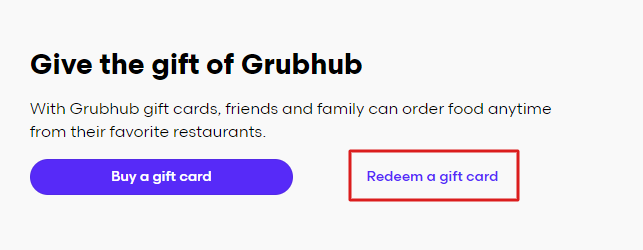
Seleccione Canjear una tarjeta regalo:
- Navega hasta el menú de la cuenta y elige la opción "Canjear una tarjeta regalo".
3
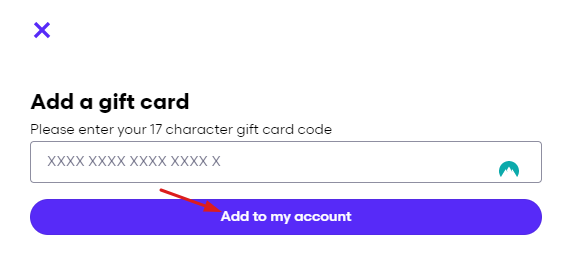
Introduzca el código de su tarjeta regalo:
- Introduce el código de la tarjeta regalo en el campo proporcionado y selecciona "Añadir a mi cuenta."
4
2. Canjea tu tarjeta regalo en la aplicación:
Abre Mi Grubhub
- Toca en "Mi Grubhub".
5
Acceda a Configuración:
- Selecciona el icono del engranaje en la esquina superior derecha.
6
Seleccione Tarjetas regalo:
- Pulse sobre "Tarjetas regalo".
7
Canjear una tarjeta regalo:
- Selecciona "Canjear una tarjeta regalo".
8
Introduzca el código de su tarjeta regalo:
- Siga las instrucciones para introducir el código de su tarjeta regalo y añadir el saldo a su cuenta.