.svg?ts=1784208609)
Modern Warships Direct Top-Up Activation Guide
1
Seleccionar moneda:
- Elige el paquete de Gold o Dollars en Modern Warship.
- Revisa la selección antes de continuar.
2
Ingresar Player ID:
- Introduce tu Modern Warship ID para continuar.
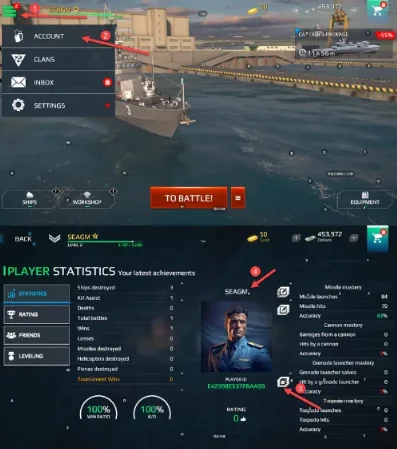
- Para encontrarla, inicia sesión en el juego, ve a Settings y entra en Account.
- Tu Player ID y Character Name se mostrarán allí.
3
Completar el pago:
- Accede al pago después de ingresar tu ID.
- Selecciona un método de pago y confirma la compra.
4
Recibir moneda:
- Tras el pago, Gold o Dollars se acreditarán en tu cuenta de Modern Warship.
- Verifica tu saldo dentro del juego.