


Persona 5: The Phantom X Direct Top-Up Activation Guide
1
Seleccionar Alien Crystals:
- Elige la denominación de Alien Crystal de Persona 5: The Phantom X que deseas comprar.
- Revisa tu selección antes de continuar.
2
Ingresar Game ID y Character ID:
- Introduce tu Game ID y Character ID de Persona 5: The Phantom X en los campos correspondientes.
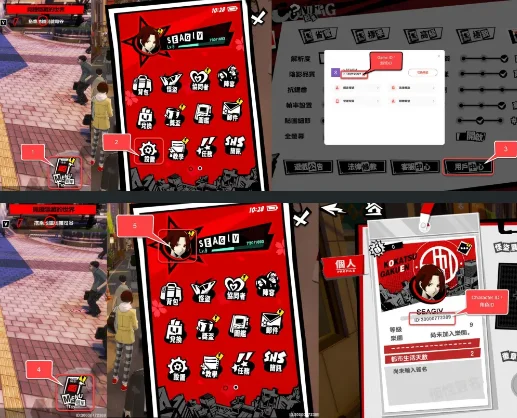
- Para encontrar tu Game ID, inicia sesión en el juego con tu cuenta.
- Toca el icono de Menú en la esquina inferior derecha de la pantalla.
- Abre Configuración y selecciona el icono de Centro de usuario.
- Tu Game ID aparecerá en esta pantalla.
- Para encontrar tu Character ID, toca nuevamente el icono de Menú.
- Selecciona el icono de Avatar.
- Tu Character ID aparecerá en esta pantalla.
3
Completar el pago:
- Accede al pago después de introducir tu Game ID y Character ID.
- Selecciona tu método de pago preferido y confirma la compra.
4
Recibir Alien Crystals:
- Una vez completado el pago, los Alien Crystals de Persona 5: The Phantom X se acreditarán en tu cuenta en breve.
- Verifica tu saldo dentro del juego para confirmar la entrega.


