











































































































Ragnarok Idle Adventure Plus Direct Top-Up Activation Guide
1
Seleziona Voucher:
- Scegli la quantità di Voucher Ragnarok Idle Adventure Plus che desideri acquistare.
- Controlla la selezione prima di procedere.
2
Inserisci le informazioni dell'account:
- Inserisci il tuo Secret Code, Server e Nome Personaggio nei campi richiesti.
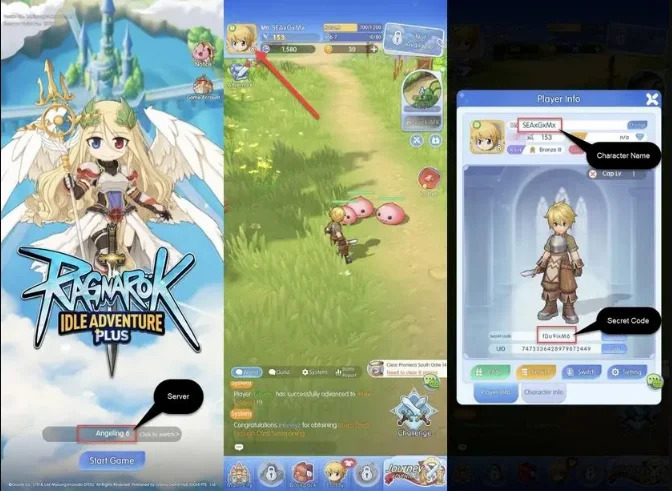
- Per trovare il tuo Server, accedi a Ragnarok Idle Adventure Plus con il tuo account.
- Il tuo Server verrà visualizzato al centro della schermata principale.
- Per trovare il tuo Secret Code e Nome Personaggio, entra nel gioco e tocca l'icona Avatar nell'angolo in alto a sinistra della schermata principale.
- Il tuo Secret Code e Nome Personaggio verranno visualizzati.
3
Completa il pagamento:
- Procedi al checkout dopo aver inserito le informazioni del tuo account.
- Seleziona il metodo di pagamento preferito e conferma l'acquisto.
4
Ricevi il tuo Voucher:
- Una volta completato il pagamento, il Voucher Ragnarok Idle Adventure Plus sarà accreditato sul tuo account a breve.
- Controlla il tuo inventario di gioco per confermare la consegna.