Harry Potter: Magic Awakened Activation Guide
1
Seleccionar la cantidad de Jewels:
- Elige el paquete de Jewels para Harry Potter: Magic Awakened.
- Asegúrate de que la selección corresponde a la cuenta correcta.
2
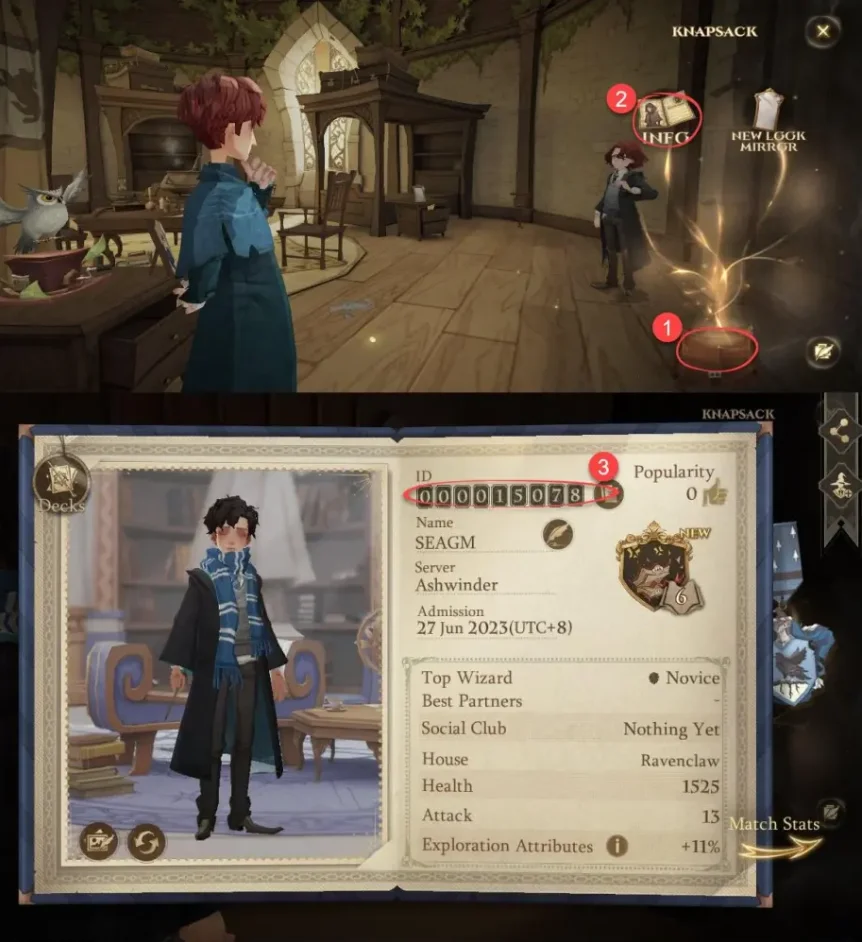
Introducir User ID:
- Inicia sesión en Harry Potter: Magic Awakened.
- Toca KNAPSACK en la esquina inferior derecha y luego INFO.
- Tu User ID aparecerá en pantalla; introdúcelo en el campo requerido.
3
Completar el pago:
- Verifica el paquete de Jewels seleccionado y el User ID.
- Elige el método de pago y confirma el pedido.
4
Recibir Jewels en el juego:
- Después del pago, los Jewels se añadirán a tu cuenta de Harry Potter: Magic Awakened.
- Abre el juego y revisa el saldo.