Honkai: Star Rail Activation Guide
1
Wybierz ilość Oneiric Shards:
- Wybierz pakiet Oneiric Shards do Honkai: Star Rail.
- Upewnij się, że wybrana ilość dotyczy właściwego konta.
2
Podaj User ID:
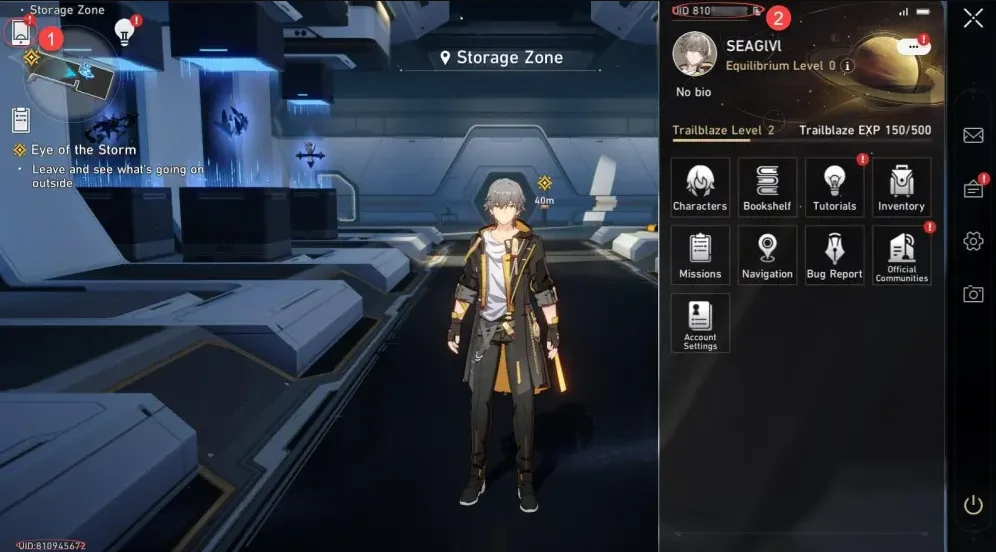
- Uruchom Honkai: Star Rail i sprawdź UID w lewym dolnym rogu ekranu.
- UID jest także widoczne w menu telefonu w grze.
- Wpisz User ID dokładnie tak, jak jest pokazane.
3
Zakończ płatność:
- Sprawdź wybraną ilość Oneiric Shards oraz User ID.
- Wybierz metodę płatności i potwierdź zamówienie.
4
Odbierz Oneiric Shards w grze:
- Po zakończeniu płatności Oneiric Shards zostaną dodane do konta Honkai: Star Rail.
- Uruchom grę i sprawdź saldo.