.svg?ts=1784207923)
Infinite Borders Direct Top-Up Activation Guide
1
Selectează Jades:
- Alege pachetul de Jades Infinite Borders pe care dorești să îl achiziționezi.
- Verifică selecția înainte de a continua.
2
Introdu User ID:
- Introdu User ID-ul tău Infinite Borders în câmpul necesar.
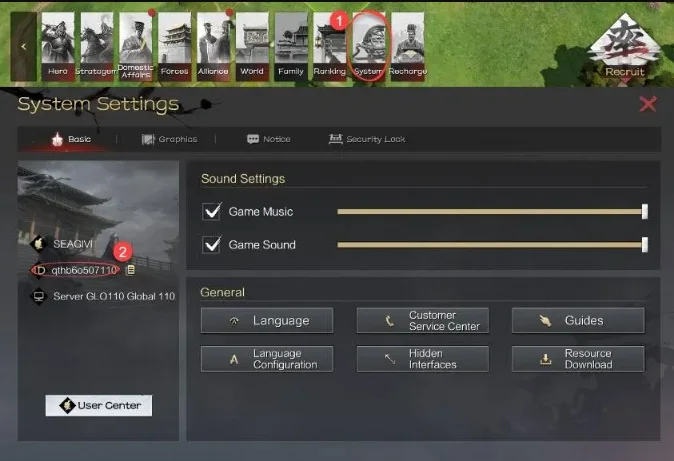
- Pentru a găsi User ID-ul, conectează-te la joc folosind contul tău.
- Deschide secțiunea Setări sistem.
- User ID-ul tău va fi afișat pe acest ecran.
3
Finalizează plata:
- Continuă către finalizarea comenzii după introducerea User ID-ului.
- Selectează metoda de plată preferată și confirmă achiziția.
4
Primește Jades:
- După finalizarea plății, Jades Infinite Borders vor fi adăugate în contul tău în scurt timp.
- Verifică soldul din joc pentru a confirma livrarea.