Marvel Rivals Direct Top-Up Activation Guide
1
Seleziona il pacchetto di Lattices:
- Scegli la quantità di Lattices di Marvel Rivals che vuoi acquistare tra i tagli disponibili.
- Assicurati che il pacchetto selezionato sia adatto al tuo budget e alle tue esigenze di gioco.
2
Inserisci il tuo UID di Marvel Rivals:
- Accedi a Marvel Rivals con il tuo account.
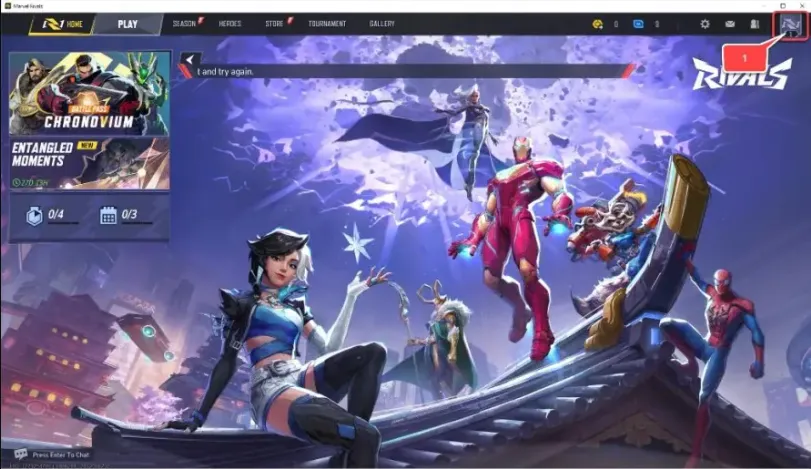
- Tocca l’icona "Avatar" nell’angolo in alto a destra della schermata principale.
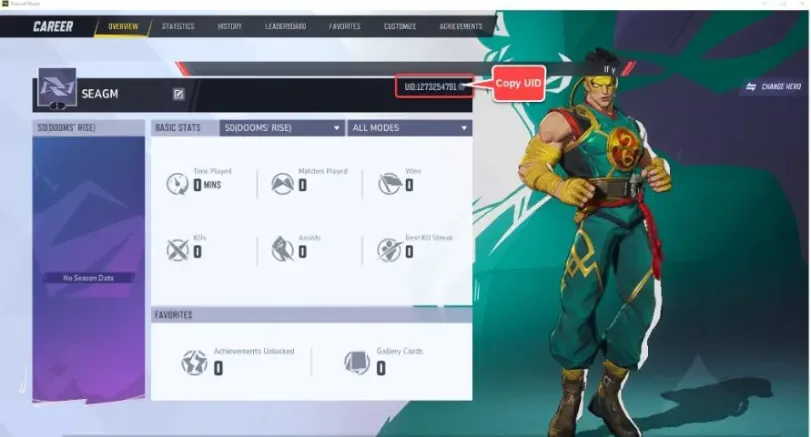
- Individua il tuo UID mostrato nella schermata profilo e inseriscilo esattamente nel modulo di top-up.
3
Conferma l’ordine e paga:
- Procedi al checkout dopo aver inserito il tuo UID.
- Seleziona il metodo di pagamento che preferisci tra le opzioni disponibili.
- Conferma il pagamento e attendi che venga elaborato con successo.
4
Ricevi i Lattices e verifica:
- Una volta completato il pagamento, i Lattices di Marvel Rivals acquistati verranno accreditati a breve sul tuo account.
- Riapri o aggiorna il gioco e controlla il saldo Lattices nella schermata principale.
- Se i Lattices non compaiono dopo un po’ di tempo, ricontrolla che l’UID sia stato inserito correttamente e contatta il nostro supporto se necessario.