PUBG: New State Activation Guide
1
Sélectionner le montant de NC:
- Choisissez la quantité de NC pour New State Mobile.
- Vérifiez que la sélection correspond au bon compte.
2
Saisir l’Account ID:
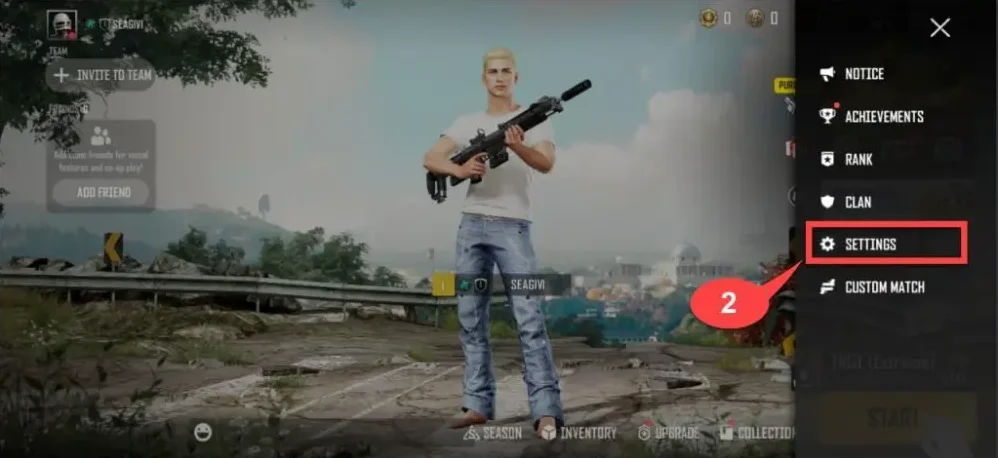
- Connectez-vous à New State Mobile.
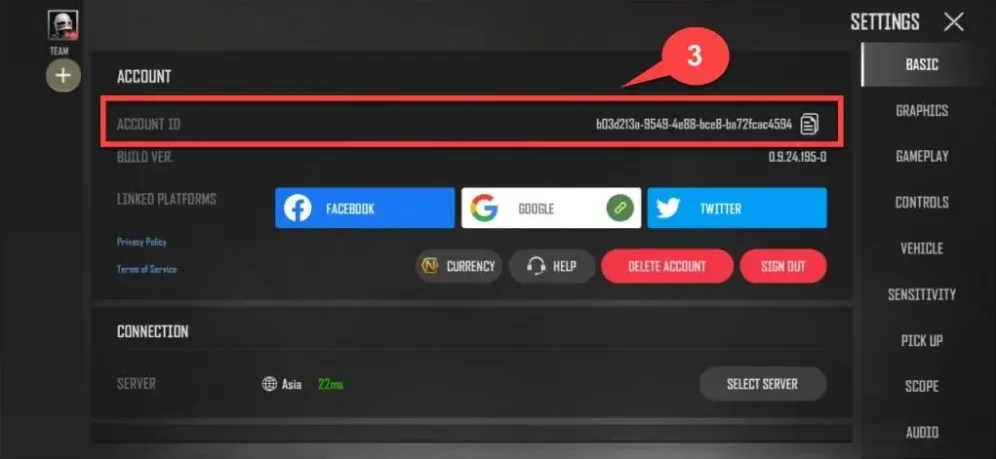
- Appuyez sur l’icône View More en haut à droite puis ouvrez les paramètres.
- L’Account ID est affiché à l’écran, saisissez-le dans le champ requis.
3
Finaliser le paiement:
- Vérifiez le montant de NC et l’Account ID.
- Choisissez votre mode de paiement et confirmez la commande.
4
Recevoir le NC en jeu:
- Après validation du paiement, le NC sera ajouté à votre compte New State Mobile.
- Lancez le jeu et vérifiez votre solde.