Cartes cadeaux Zalando
1
Aller sur le site de Zalando:
- Rendez-vous sur le site officiel de Zalando dans votre navigateur.
- Si vous ne l'avez pas encore fait, créez un compte Zalando ou connectez-vous à votre compte existant.
2
Sélectionner des articles:
- Parcourez le catalogue Zalando et ajoutez des articles à votre panier.
3
Passez à la caisse:
- Une fois que vous avez sélectionné les articles que vous souhaitez acheter, allez dans votre panier et passez à la caisse.
4
Saisir les informations relatives à l'expédition:
- Remplissez vos coordonnées de livraison et passez aux options de paiement.
5
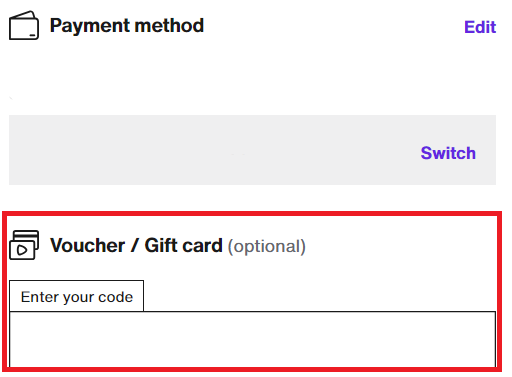
Sélectionnez l'option carte-cadeau:
- Dans les options de paiement, vous devriez voir une option permettant de payer avec une carte cadeau. Sélectionnez cette option.
6
Appliquer:
- Après avoir saisi le code de la carte-cadeau, appliquez-le à votre achat. Le solde de la carte cadeau sera déduit du montant total de vos achats.
7
Confirmer l'achat:
- Terminez la procédure de paiement. Si la carte-cadeau ne couvre pas le coût total, vous serez invité à régler le solde avec un autre mode de paiement.