Free Fire Max Direct Top-Up Activation Guide
1
Seleziona la quantità di Diamonds:
- Scegli la quantità di Diamonds per Free Fire Max.
- Assicurati che la selezione sia per l’account corretto.
2
Inserisci Player ID:
- Accedi a Free Fire Max con il tuo account.
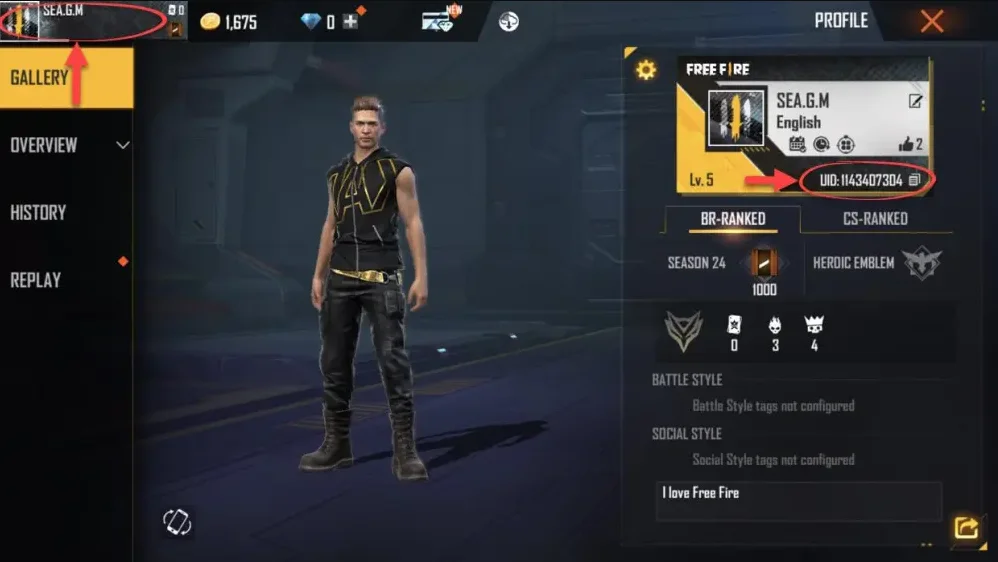
- Tocca il tuo avatar nell’angolo in alto a sinistra della schermata principale.
- Il Player ID è visibile nel profilo — inseriscilo nel campo richiesto.
3
Completa il pagamento:
- Controlla la quantità di Diamonds selezionata e il Player ID inserito.
- Scegli il metodo di pagamento e conferma l’ordine.
4
Ricevi i Diamonds nel gioco:
- Dopo il pagamento, i Diamonds verranno accreditati sul tuo account Free Fire Max.
- Apri il gioco e verifica il saldo per confermare la ricarica.