Free Fire Membership Direct Top-Up Activation Guide
1
Mitgliedschaft auswählen:
- Wählen Sie die gewünschte Free Fire Mitgliedschaft aus.
- Stellen Sie sicher, dass die ausgewählte Mitgliedschaft für das richtige Konto bestimmt ist.
2
Player ID eingeben:
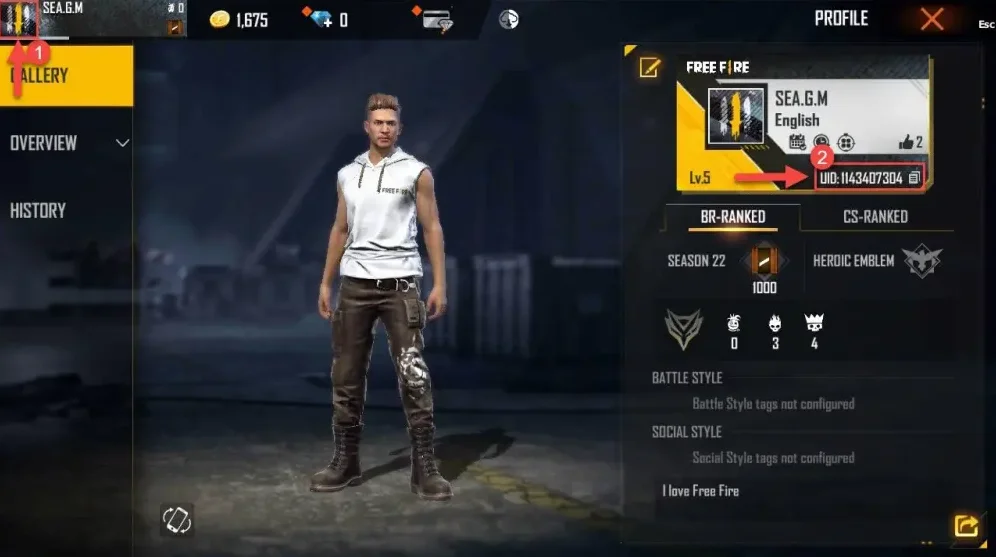
- Melden Sie sich bei Free Fire an und tippen Sie oben links auf Ihr Avatar-Symbol.
- Ihre Player ID wird im Profil angezeigt — geben Sie diese in das entsprechende Feld ein.
- Geben Sie die Player ID korrekt ein, um Verzögerungen bei der Aktivierung zu vermeiden.
3
Zahlung abschließen:
- Überprüfen Sie die ausgewählte Mitgliedschaft und die eingegebene Player ID.
- Wählen Sie eine Zahlungsmethode und bestätigen Sie die Bestellung.
4
Mitgliedschaft im Spiel erhalten:
- Nach erfolgreicher Zahlung wird die Free Fire Mitgliedschaft Ihrem Konto gutgeschrieben.
- Sie können im Spiel eingeloggt bleiben und den Status im Konto überprüfen.