
















































































PUBG Mobile Pass Activation Guide
1
Seleziona il Royale Pass:
- Scegli il pacchetto Royale Pass di PUBG Mobile.
- Assicurati che la selezione sia per la stagione corrente e per l’account corretto.
2
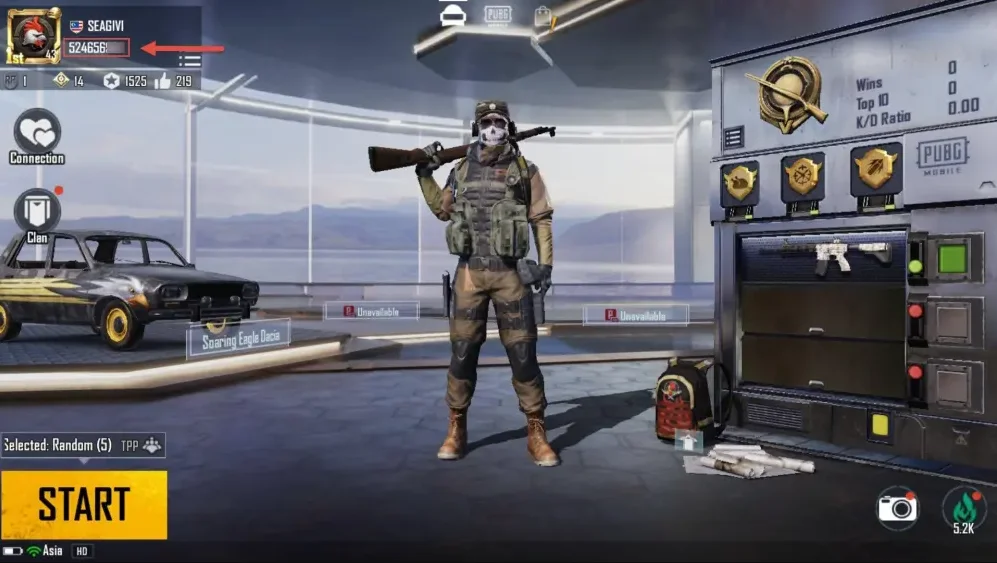
Inserisci Player ID:
- Accedi a PUBG Mobile e apri il profilo giocatore.
- Il Player ID è visibile nel profilo.
- Inserisci il Player ID esattamente come mostrato per evitare ritardi.
3
Completa il pagamento:
- Controlla il Royale Pass selezionato e il Player ID.
- Scegli il metodo di pagamento e conferma l’ordine.
4
Ricevi il Royale Pass nel gioco:
- Dopo il pagamento, il Royale Pass verrà aggiunto al tuo account PUBG Mobile.
- Il pacchetto può essere acquistato solo una volta per stagione e non può essere aggiornato.
- Rimani connesso e verifica il tuo account.