


Free Fire Max Membership Direct Top-Up Activation Guide
1
Mitgliedschaft auswählen:
- Wählen Sie die gewünschte Free Fire Max Mitgliedschaft.
- Stellen Sie sicher, dass die Auswahl für das richtige Spielkonto erfolgt.
2
Player ID eingeben:
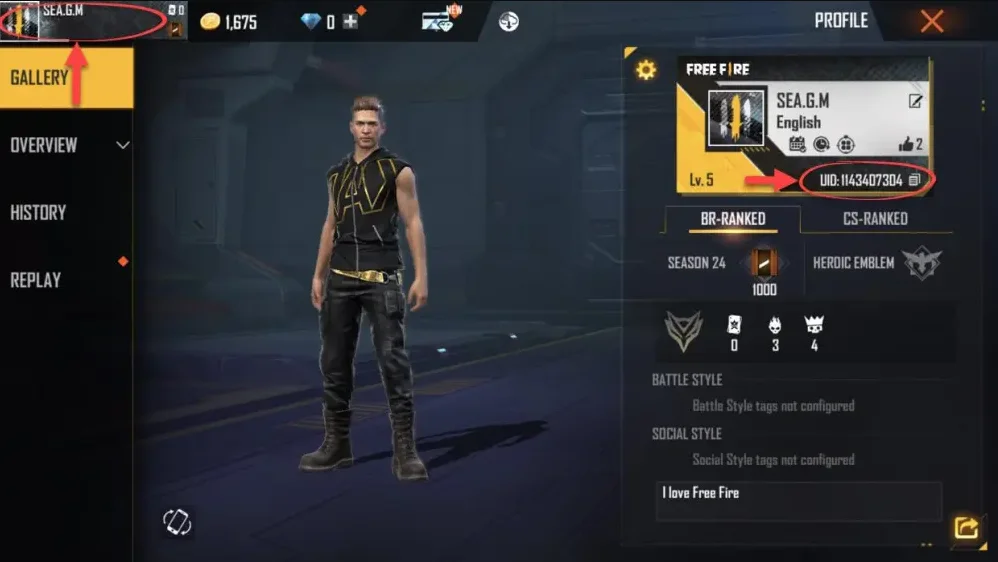
- Melden Sie sich bei Free Fire Max an und tippen Sie oben links auf Ihr Avatar-Symbol.
- Ihre Player ID wird im Profil angezeigt.
- Geben Sie die Player ID genau wie angezeigt ein.
3
Zahlung abschließen:
- Überprüfen Sie die ausgewählte Mitgliedschaft und die eingegebene Player ID.
- Wählen Sie eine Zahlungsmethode und bestätigen Sie die Bestellung.
4
Mitgliedschaft im Spiel erhalten:
- Nach erfolgreicher Zahlung wird die Free Fire Max Mitgliedschaft Ihrem Konto gutgeschrieben.
- Starten Sie das Spiel und prüfen Sie Ihren Account zur Bestätigung.


