Free Fire Membership Direct Top-Up Activation Guide
1
Sélectionner l’abonnement:
- Choisissez l’abonnement Free Fire souhaité.
- Vérifiez que l’abonnement sélectionné correspond au bon compte.
2
Saisir le Player ID:
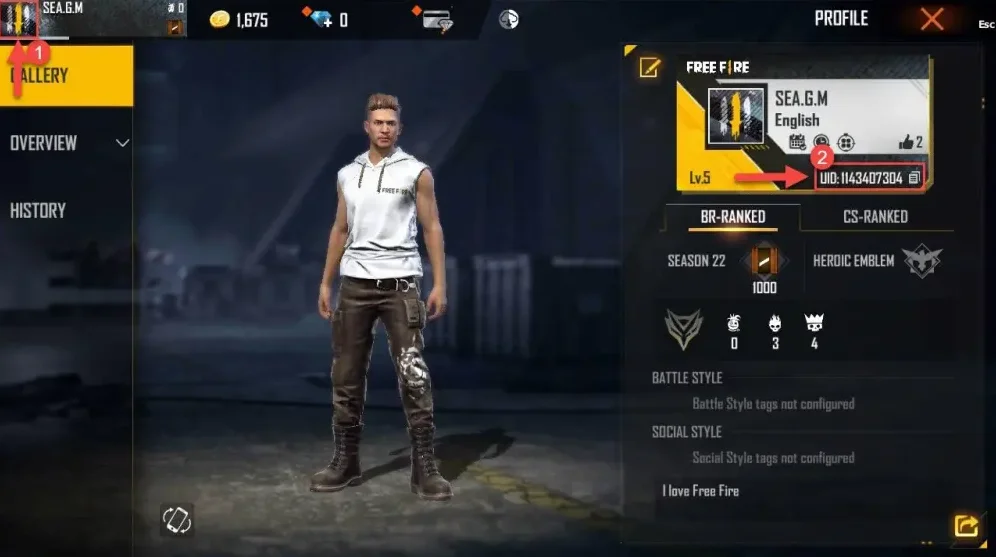
- Connectez-vous à Free Fire et appuyez sur votre avatar en haut à gauche.
- Votre Player ID apparaît dans le profil — saisissez-le dans le champ requis.
- Saisissez correctement le Player ID pour éviter tout retard.
3
Finaliser le paiement:
- Vérifiez l’abonnement sélectionné et le Player ID saisi.
- Choisissez votre mode de paiement et confirmez la commande.
4
Recevoir l’abonnement en jeu:
- Après validation du paiement, l’abonnement Free Fire sera ajouté à votre compte.
- Vous pouvez rester connecté au jeu et vérifier votre compte.