Free Fire Membership Direct Top-Up Activation Guide
1
Seleziona l’abbonamento:
- Scegli l’abbonamento Free Fire che vuoi acquistare.
- Assicurati che l’abbonamento sia destinato all’account corretto.
2
Inserisci Player ID:
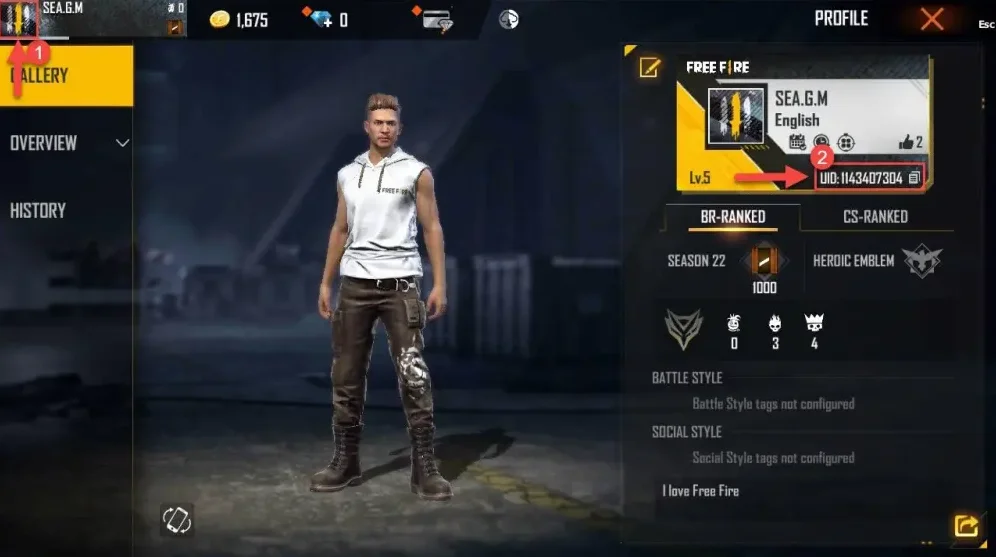
- Accedi a Free Fire e tocca il tuo avatar in alto a sinistra.
- Il Player ID è visibile nel profilo — inseriscilo nel campo richiesto.
- Inserisci correttamente il Player ID per evitare ritardi.
3
Completa il pagamento:
- Controlla l’abbonamento selezionato e il Player ID inserito.
- Scegli il metodo di pagamento e conferma l’ordine.
4
Ricevi l’abbonamento nel gioco:
- Dopo il pagamento, l’abbonamento Free Fire verrà aggiunto al tuo account.
- Puoi restare connesso al gioco e verificare lo stato nel tuo profilo.