MapleStory M Direct Top-Up Activation Guide
1
Betrag auswählen:
- Wählen Sie die gewünschte Menge an Cash Points aus.
- Überprüfen Sie Ihre Auswahl, bevor Sie fortfahren.
2
Kontodaten eingeben:
- Geben Sie Ihren Member Code, Region, Server und Spielernamen ein.
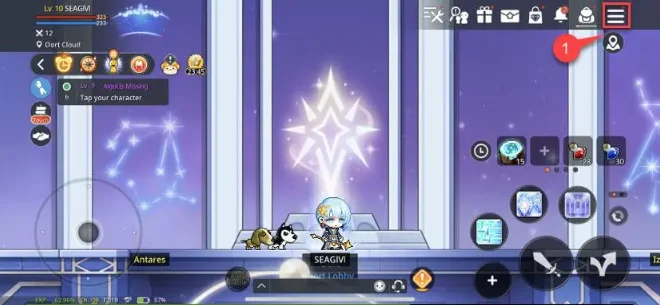
- Um den Member Code zu finden, melden Sie sich im Spiel an und öffnen Sie das Menü oben rechts.
- Tippen Sie auf das Einstellungssymbol unten rechts, um den Member Code anzuzeigen.
3
Zahlung abschließen:
- Gehen Sie nach Eingabe der Daten zur Kasse.
- Wählen Sie eine Zahlungsmethode und bestätigen Sie die Transaktion.
4
Cash Points erhalten:
- Nach erfolgreicher Zahlung werden die Cash Points Ihrem Konto gutgeschrieben.
- Die Aufladung erfolgt in der Regel kurzfristig.