

















































































Genshin Impact Direct Top-Up Activation Guide
1
Select Chronal Nexus Package:
- Choose the Genshin Impact Miliastra Wonderland Chronal Nexus amount you want to purchase from the available denominations.
- Make sure the selected package matches your budget and in-game needs.
2
Enter User ID and Server:
- Log in to your Genshin Impact account and open the game.
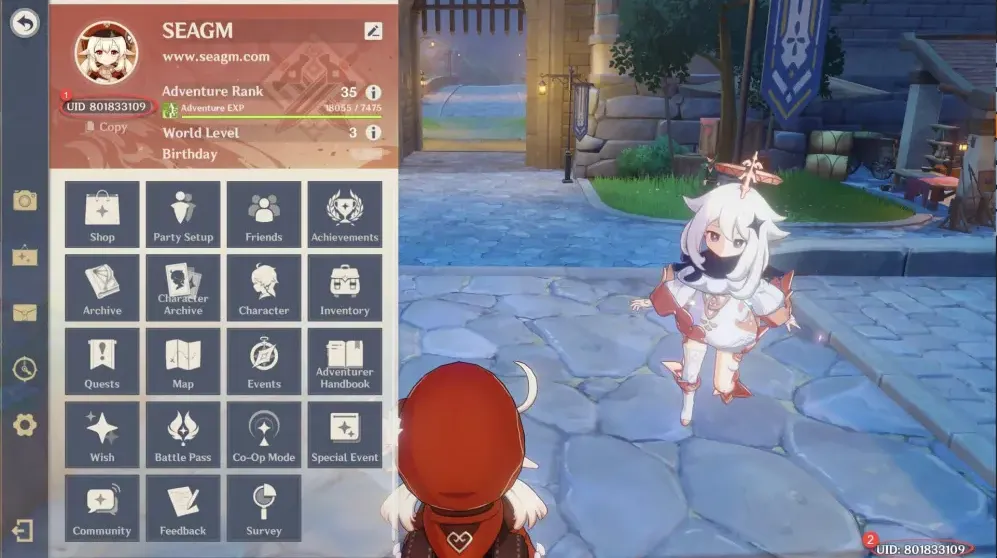
- Click your Traveler profile in the top-left corner of the screen.
- Find your User ID shown under your avatar or at the bottom-right of the screen, then enter this ID and select the correct server in the top-up form.
3
Confirm Order and Pay:
- Proceed to checkout after entering your User ID and server.
- Select your preferred payment method from the available options.
- Confirm the payment and wait for it to be processed successfully.
4
Receive Chronal Nexus and Verify:
- Once the payment is completed, the purchased Genshin Chronal Nexus will be credited to your Genshin Impact account shortly.
- Restart or refresh the game and check your in-game balance to confirm that the Chronal Nexus has arrived.
- If it does not appear after some time, double-check that the correct User ID and server were used, and contact the store’s support if needed.