Dragonheir: Silent Gods Direct Top-Up Activation Guide
1
Dragon Crystals auswählen:
- Wähle die gewünschte Dragon Crystal-Denomination für Dragonheir: Silent Gods aus.
- Überprüfe deine Auswahl, bevor du fortfährst.
2
Player ID eingeben:
- Gib deine Player ID von Dragonheir: Silent Gods in das entsprechende Feld ein.
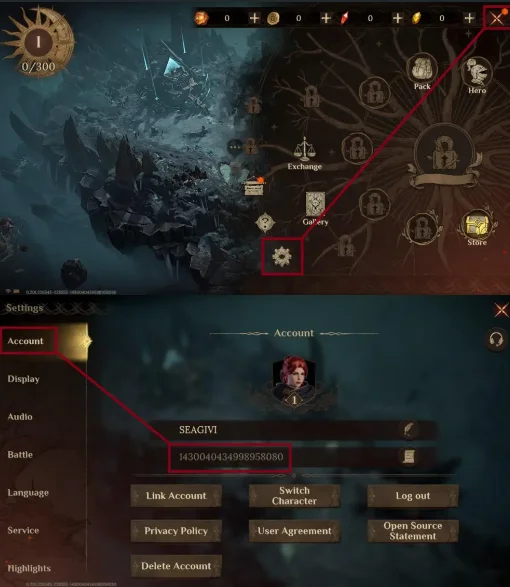
- Um deine Player ID zu finden, melde dich mit deinem Konto im Spiel an.
- Tippe auf das Spielmenü oben rechts auf dem Bildschirm.
- Wähle Spieleinstellungen.
- Deine Player ID wird im Abschnitt Konto angezeigt.
3
Zahlung abschließen:
- Gehe nach Eingabe deiner Player ID zur Kasse.
- Wähle deine bevorzugte Zahlungsmethode und schließe die Zahlung ab.
4
Dragon Crystals erhalten:
- Nach erfolgreicher Zahlung werden die Dragon Crystals deinem Dragonheir: Silent Gods-Konto in Kürze gutgeschrieben.
- Überprüfe dein In-Game-Guthaben zur Bestätigung.