




















































































































Tower of Fantasy Direct Top-Up Activation Guide
1
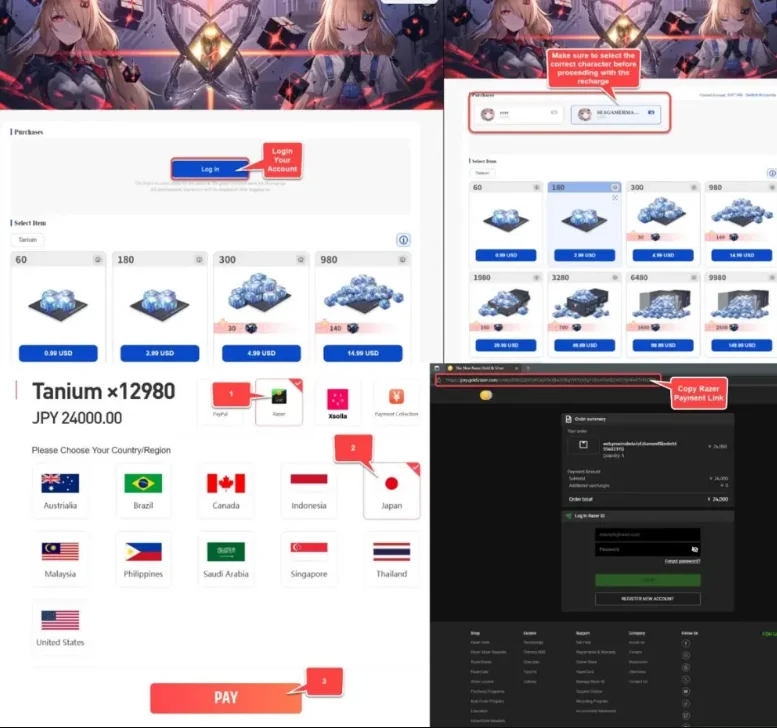
Accesează webshop-ul și autentifică-te:
- Deschide webshop-ul Tower of Fantasy în browser.
- Autentifică-te în contul tău și verifică dacă personajul principal este selectat corect.
2
Selectează pachetul Tanium:
- Alege cantitatea sau pachetul de Tanium dorit.
- În fereastra de plată selectează Razer și setează regiunea pe Japonia.
3
Continuă plata:
- Apasă pe Pay pentru a continua.
- Se va deschide o nouă filă sau fereastră cu pagina de plată Razer.
4
Copiază link-ul de plată:
- Găsește și copiază link-ul de plată de pe pagina Razer. De obicei începe cu "https://pay.gold.razer.com/order/".
- Asigură-te că este copiat corect pentru a evita problemele.