ROO Nyan Pass & License Direct Top-Up Activation Guide
1
Paket auswählen:
- Wähle das Ragnarok Origin Nyan Pass- oder License-Paket aus, das du kaufen möchtest.
- Überprüfe deine Auswahl, bevor du fortfährst.
2
Kontoinformationen eingeben:
- Gib deinen Secret Code, Server und Charakternamen in die entsprechenden Felder ein.
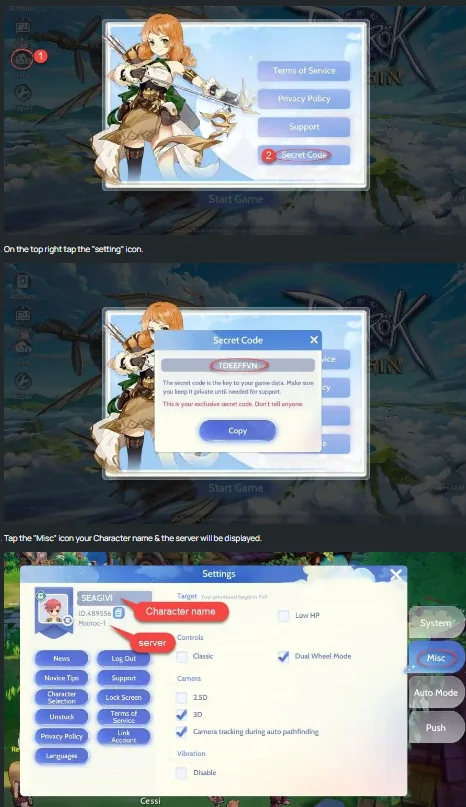
- Um deinen Secret Code zu finden, melde dich bei Ragnarok Origin an.
- Tippe auf das Info-Symbol oben links auf dem Bildschirm.
- Wähle Secret Code, um deinen Secret Code anzuzeigen.
- Um deinen Charakternamen und Server zu finden, tippe auf das Einstellungen-Symbol oben rechts.
- Wähle Misc aus. Dort werden dein Charaktername und Server angezeigt.
3
Zahlung abschließen:
- Gehe nach Eingabe deiner Kontoinformationen zur Kasse.
- Wähle deine bevorzugte Zahlungsmethode und bestätige den Kauf.
4
Paket erhalten:
- Nach erfolgreicher Zahlung wird das Ragnarok Origin Nyan Pass- oder License-Paket deinem Konto in Kürze gutgeschrieben.
- Überprüfe dein Inventar oder deine Kontovorteile im Spiel zur Bestätigung.