Blood Strike Gold Direct Top-Up Activation Guide
1
Gold-Betrag auswählen:
- Wähle die gewünschte Menge an Blood Strike Golds aus.
- Überprüfe deine Auswahl, bevor du fortfährst.
2
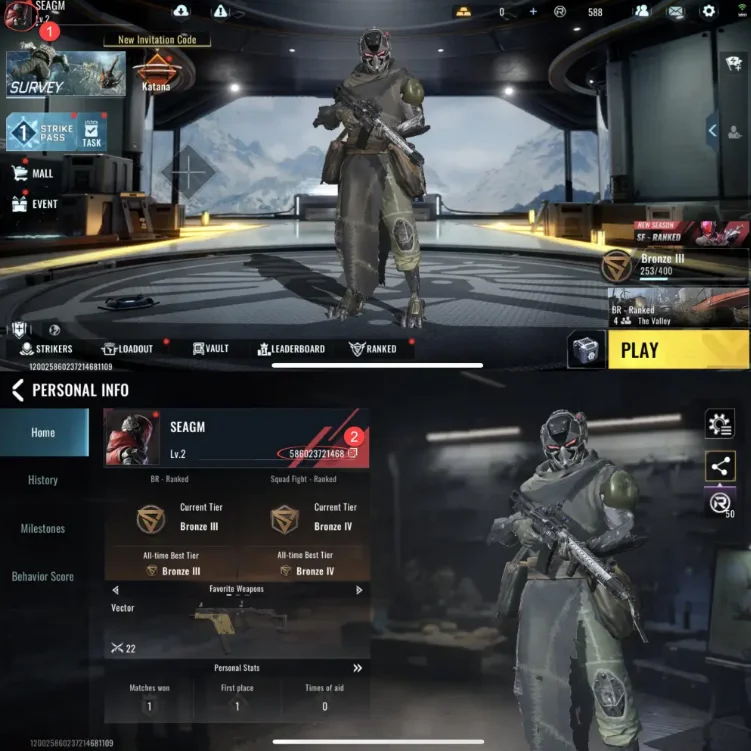
User-ID eingeben:
- Gib deine Blood Strike User ID korrekt ein.
- Öffne das Spiel und tippe oben links auf Avatar, um deine ID anzuzeigen.
3
Zahlung abschließen:
- Gehe zur Kasse, nachdem du deine Daten eingegeben hast.
- Wähle eine Zahlungsmethode und bestätige den Kauf.
4
Golds erhalten:
- Warte auf die Zahlungsbestätigung.
- Die Golds werden deinem Konto in Kürze gutgeschrieben.