Sky: Children of the Light Direct Top-Up Activation Guide
1
Betrag auswählen:
- Wählen Sie die gewünschte Anzahl an Candles aus.
- Überprüfen Sie Ihre Auswahl, bevor Sie fortfahren.
2
Kontodaten eingeben:
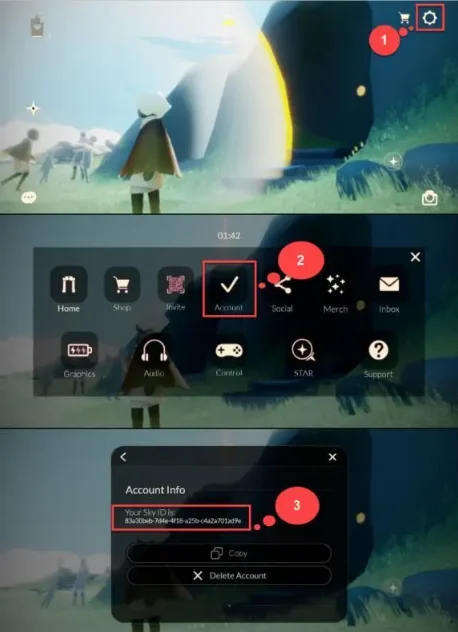
- Geben Sie Ihre Sky ID in das entsprechende Feld ein.
- Melden Sie sich im Spiel an und öffnen Sie die Einstellungen oben rechts.
- Tippen Sie auf Account, um Ihre Sky ID anzuzeigen.
3
Zahlung abschließen:
- Gehen Sie nach Eingabe der Daten zur Kasse.
- Wählen Sie eine Zahlungsmethode und bestätigen Sie die Transaktion.
4
Candles erhalten:
- Nach erfolgreicher Zahlung werden die Candles Ihrem Konto gutgeschrieben.
- Die Aufladung erfolgt in der Regel kurzfristig.