Marvel Rivals Direct Top-Up Activation Guide
1
Select Lattices Package:
- Choose the Marvel Rivals Lattices amount you want to purchase from the available denominations.
- Make sure the selected package suits your budget and in‑game needs.
2
Enter Marvel Rivals UID:
- Log in to Marvel Rivals with your account.
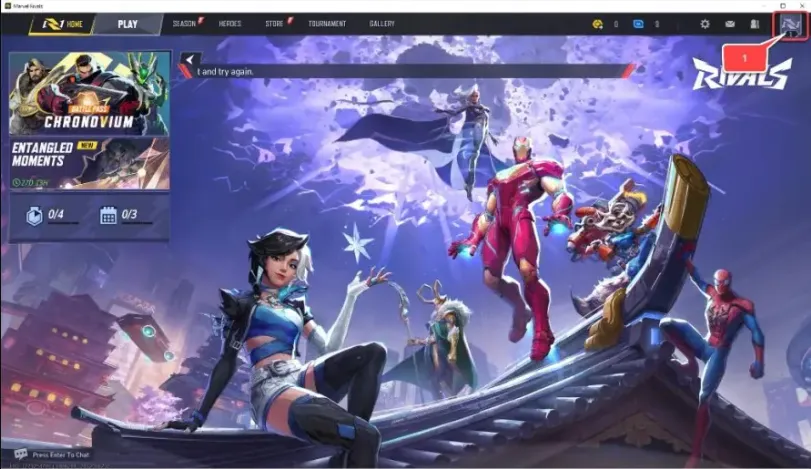
- Tap the "Avatar" icon in the top-right corner of the main screen.
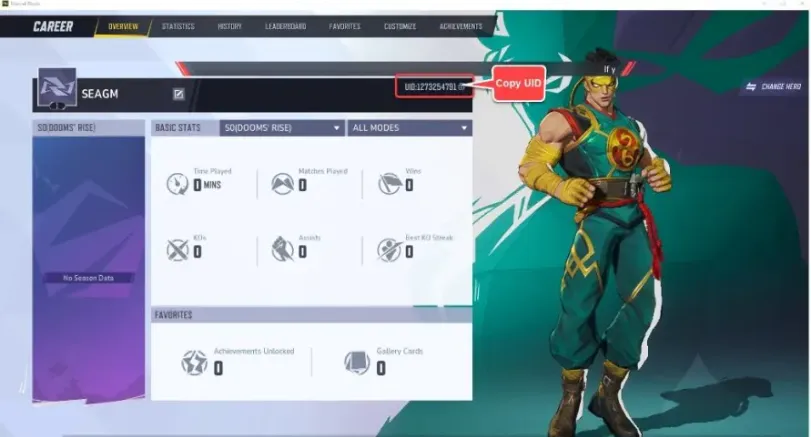
- Locate your UID displayed on the profile screen and enter it exactly into the top-up form.
3
Confirm Order and Pay:
- Proceed to checkout after entering your UID.
- Select your preferred payment method from the options.
- Confirm the payment and wait for it to be processed successfully.
4
Receive Lattices and Verify:
- Once the payment is completed, the purchased Marvel Rivals Lattices will be credited to your account shortly.
- Reopen or refresh the game and check your Lattices balance on the main screen.
- If the Lattices do not appear after some time, double‑check that the UID was entered correctly and contact our support if needed.