


Mobile Legends Direct Top-Up Activation Guide
1
Sélectionnez le pack de Diamonds :
- Choisissez le montant de Diamonds Mobile Legends (ML) que vous souhaitez acheter dans la liste des montants disponibles.
- Assurez-vous que le pack de Diamonds sélectionné correspond à votre budget et à vos besoins en jeu (skins, Battle Pass, etc.).
2
Saisissez votre ML User ID et Zone ID :
- Connectez-vous à Mobile Legends: Bang Bang avec votre compte.
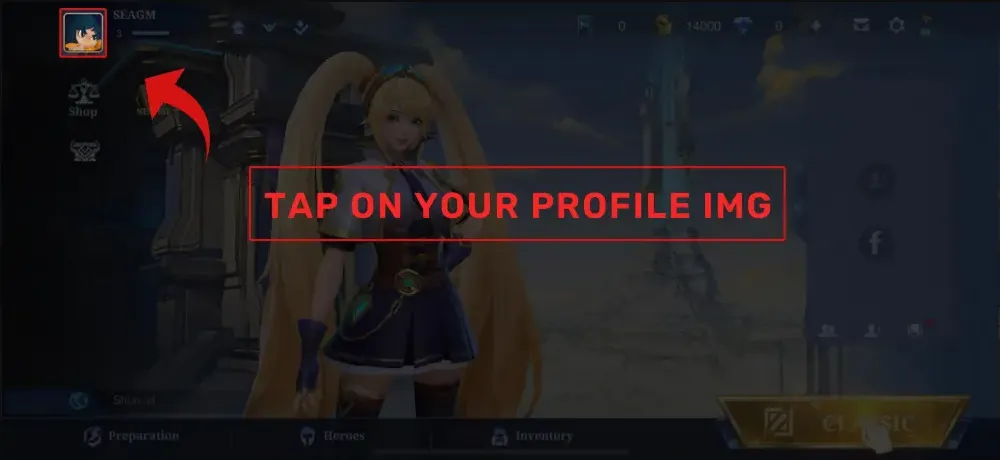
- Appuyez sur votre avatar en haut à gauche de l’écran principal pour ouvrir votre profil.
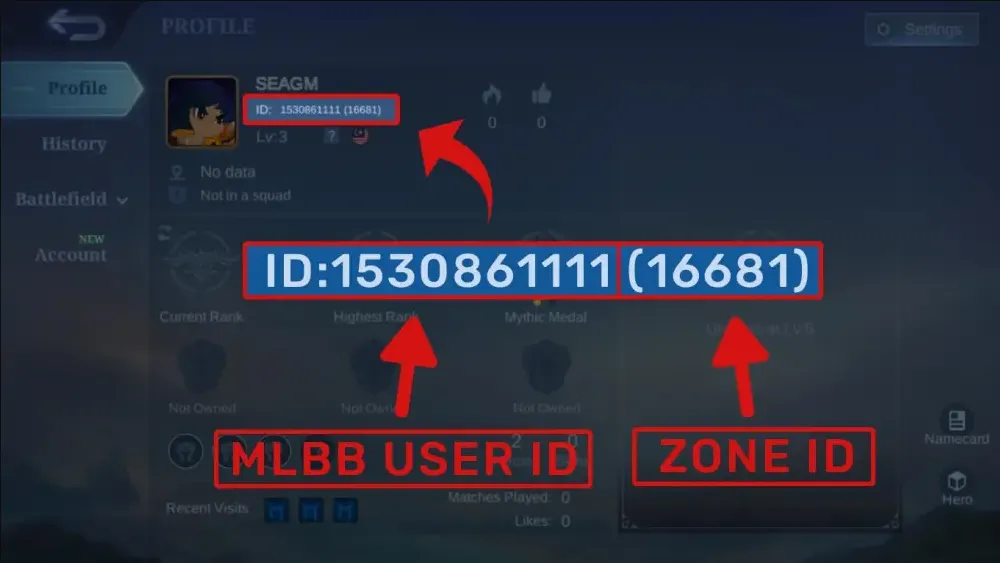
- Trouvez vos informations affichées, par exemple User ID: 12345678 (1234), puis saisissez l’User ID et le Zone ID exactement comme indiqués.
3
Confirmez la commande et payez :
- Accédez au paiement après avoir saisi vos informations d’identification.
- Sélectionnez votre mode de paiement préféré (carte, portefeuille électronique ou options de paiement locales, par exemple).
- Confirmez le paiement et attendez qu’il soit traité avec succès.
4
Recevez les Diamonds et vérifiez :
- Une fois le paiement effectué, les Diamonds ML achetés seront crédités sur votre compte MLBB sous peu.
- Reconnectez-vous au jeu (ou redémarrez-le) et vérifiez votre solde de Diamonds en haut de l’écran du lobby.
- Si les Diamonds n’arrivent pas après un certain temps, vérifiez à nouveau que vous avez utilisé le bon User ID et le bon Zone ID, puis contactez le support de la boutique si nécessaire.


