Office
1
Open an Office Application:
- Open any installed Office program such as Word, Excel, or PowerPoint.
2
Welcome Screen:
- When you open an Office application for the first time, you may see a Welcome screen. Choose the "Activate" option. If you don't see a welcome screen, create a new document or open an existing one, then go to the "File" menu and select "Account".
3
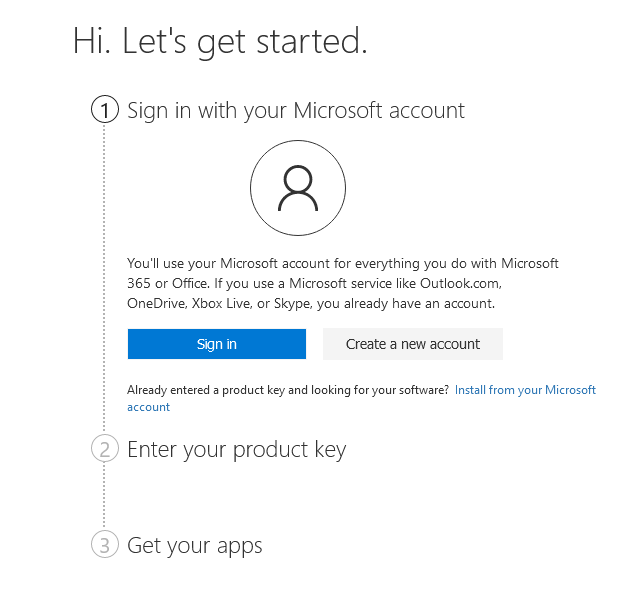
Sign in to Microsoft Account:
- You will be prompted to sign in to your Microsoft account. Use the account you used to purchase or subscribe to Office. This will usually auto-retrieve the license tied to your account.
OR
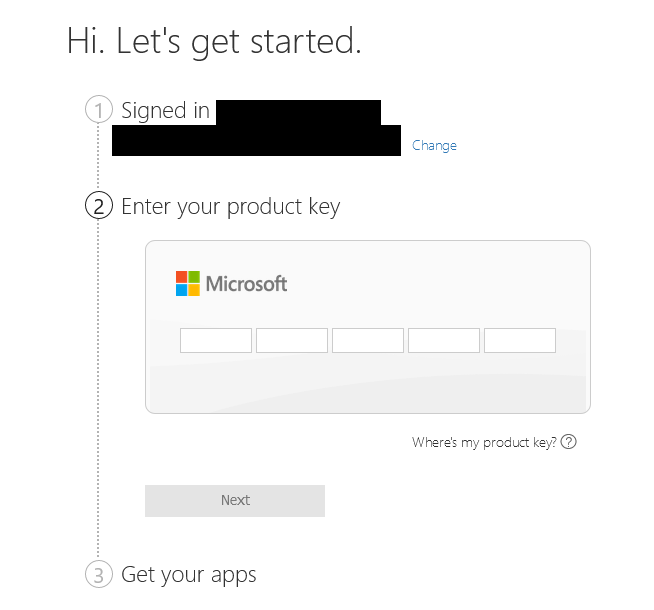
- Enter Product Key: If you bought a retail version of Microsoft Office, you should have received a product key. Choose "Enter a Product Key Instead" if you see that option, and enter your 25-character product key.
4
Follow On-Screen Instructions:
- Follow any on-screen prompts to complete the activation process.
5
Confirmation:
- You should receive a message indicating that the activation was successful. You'll also see an "Activated" status in your Office application under File > Account near your subscription details.

-43%
 Microsoft Store

-33%
 Steam
Steam

-50%
Microsoft Store

-32%
Steam

-49%
Microsoft Store

-64%
 Steam Gift

-68%
Microsoft Store
Xbox Game Pass Ultimate - 1 Month Non-Stackable
United States
Microsoft Store
UNITED STATES
26.99 €
8.56 €