Arena Breakout Activation Guide
1
Select the Bonds amount:
- Choose the Arena Breakout Bonds package you want to purchase.
- Confirm that the selected amount is intended for the correct game account.
2
Enter your Player ID:
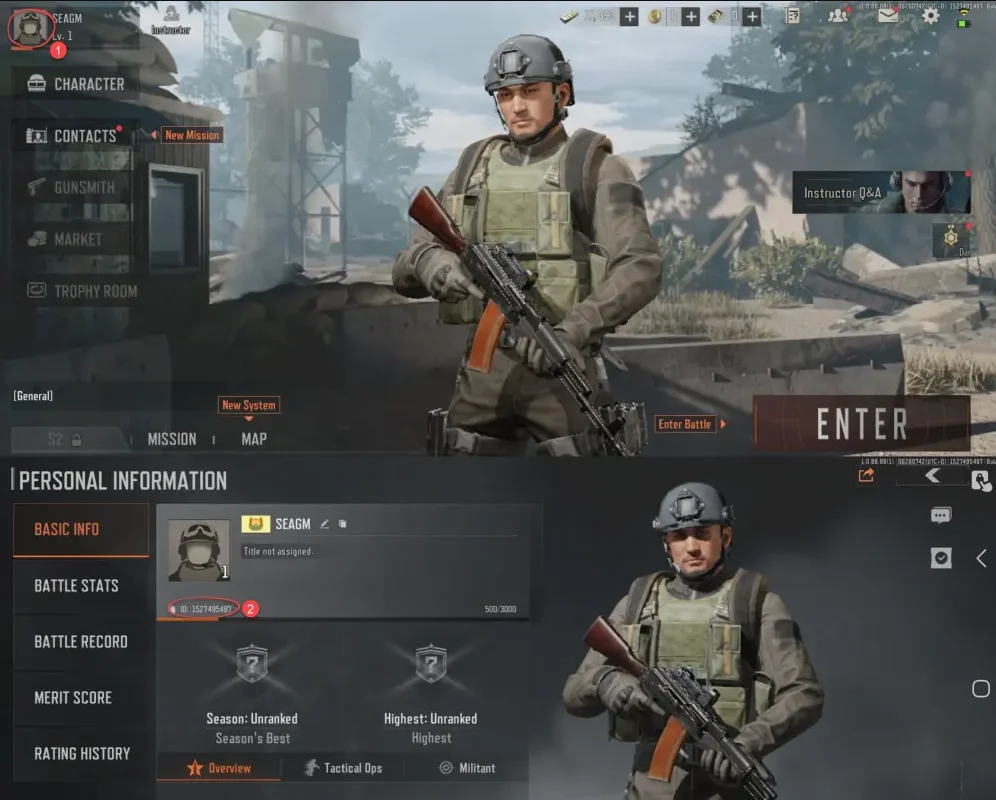
- Log in to Arena Breakout using your account.
- Open the Profile section from the upper-right corner of the screen.
- Locate your Player ID on the profile page and enter it in the required field.
3
Complete the payment:
- Verify the selected Bonds package and the Player ID you entered.
- Select your payment method and confirm the order.
4
Receive Bonds in game:
- After the payment is processed, the Arena Breakout Bonds will be added to your account.
- Open the game and check your balance to confirm the top-up.