Mobile Legends: Adventure Activation Guide
1
Select the M-Cash amount:
- Choose the M-Cash denomination you want to purchase for Mobile Legends: Adventure.
- Make sure the selected amount is intended for the correct game account.
2
Enter Account ID and Server:
- Log in to Mobile Legends: Adventure using your account.
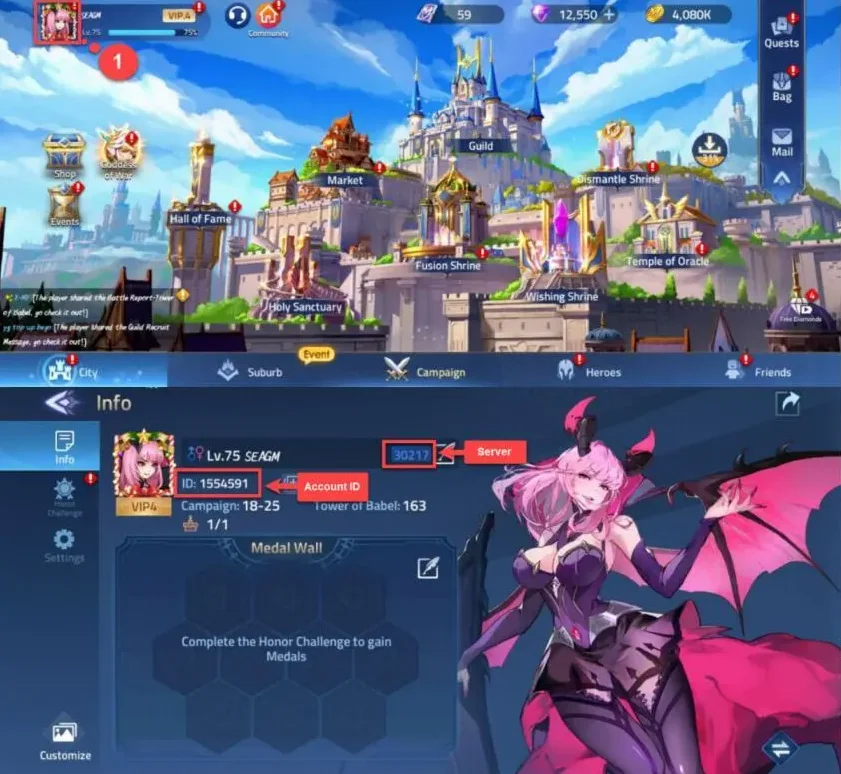
- Tap the profile icon in the upper-left corner of the screen.
- Find your Account ID and Server on the profile page and enter them in the required fields.
3
Complete the payment:
- Check the selected M-Cash amount and confirm the Account ID and Server.
- Select your payment method and confirm the order.
4
Receive M-Cash in game:
- After the payment is processed, the M-Cash will be added to your Mobile Legends: Adventure account.
- Open the game and check your balance to confirm the top-up.