Skip to main content Skip to search Skip to main navigation

Activation guides

Back

Puzzles & Survival Direct Top-Up Activation Guide

1

Select Voucher:

  • Choose the Voucher amount you want to purchase for Puzzles & Survival.
  • Check your selection before moving to the next step.
2

Enter Account Details:

  • Provide your Account ID, Character Name, and select the correct server.
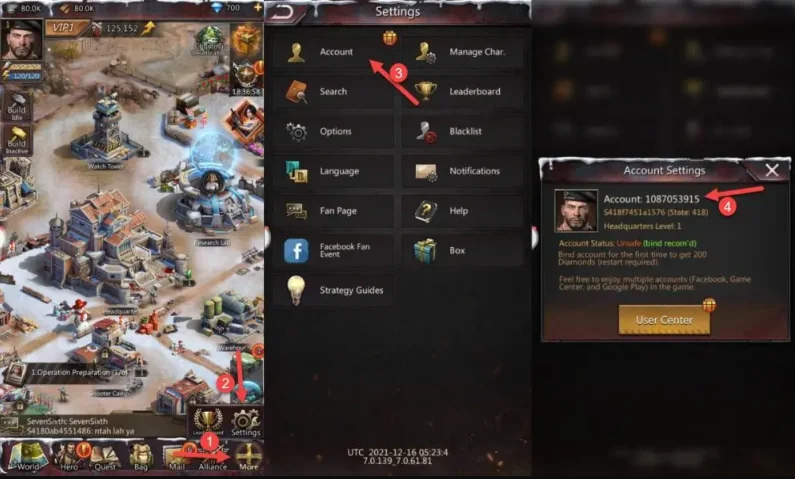
  • To find your Account ID, log in to the game, tap More in the bottom-right corner, then open Settings and Account.
  • Ensure all details are entered correctly to avoid delays.
3

Complete Payment:

  • Proceed to checkout after entering your account information.
  • Select your payment method and confirm the purchase.
4

Receive and Use Vouchers:

  • After payment, the Vouchers will be sent to your in-game mailbox.
  • Open your mailbox to collect them and use them in the Voucher Mall.
  • Any Voucher spent will count toward your total top-up.
Project Zomboid (PC)
-62%
Steam Gift Steam Gift
Steam Gift
GLOBAL
19.49 € 7.41 €
6.30 € with
1x Master Mystery Steam Key
-33%
Steam Steam
Steam
GLOBAL
5.99 € 3.99 €
3.39 € with
The Blood of Dawnwalker (PC)
-36%
Steam Steam
Steam
EUROPE
69.99 € 44.77 €
42.08 € with
Xbox Game Pass Ultimate - 1 Month Non-Stackable
-68%
Microsoft Store Microsoft Store
Microsoft Store
UNITED STATES
26.99 € 8.57 €
7.88 € with
Minecraft: Java & Bedrock Edition (PC)
-43%
Microsoft Store Microsoft Store
Microsoft Store
GLOBAL
29.99 € 17.12 €
14.55 € with
Xbox Game Pass Ultimate - 1 Month Non-Stackable
-49%
Microsoft Store Microsoft Store
Microsoft Store
GLOBAL
26.99 € 13.69 €
12.59 € with
Tinder Gold - 1 Month
-82%
Tinder Tinder
Tinder
EUROPE
20.99 € 3.73 €
3.17 € with
Xbox Game Pass Ultimate - 1 Month Non-Stackable
-49%
Microsoft Store Microsoft Store
Microsoft Store
EUROPE
26.99 € 13.85 €
12.74 € with
