Shutterfly Gift Card
1
1. Redeeming a Shutterfly Gift Carde on Website:
Sign In to Your Shutterfly Account:
- Log in to your Shutterfly account on the Shutterfly website.
2
Access the Promotions Section:
- Click on 'Hi, (Your Name)' in the upper right corner of the page.
3
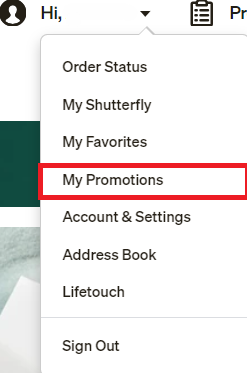
Navigate to My Promotions:
- Select 'My Promotions' from the dropdown menu.
4
Enter the Gift Certificate Code:
- Input the 19-character code from your gift certificate into the provided box.

5
Apply the Code:
- Click 'Apply' to redeem your gift certificate.
6
Confirm Redemption:
- A message will appear confirming that the Gift Certificate has been entered successfully, and you will see the current balance reflected in your account.
7
2. Redeeming Your Shutterfly Gift Card in the App:
Sign In to Your Shutterfly Account
- Open the Shutterfly app and log in to your account.
8
Access Account Settings:
- Tap the Person icon in the upper right corner of the screen.
9
Navigate to Promos and Gift Cards:
- Select 'Promos and Gift Cards' from the menu options.
10
Enter the Gift Card Number:
- Input the Gift Card Number into the top box labeled 'Enter promo code or gift certificate.'
11
Redeem the Gift Card:
- Tap to apply the gift card and your balance will be updated accordingly.