


Tales of Wind Direct Top-Up Activation Guide
1
Prepare account details:
- Make sure you have your Role ID and character name ready.
- Ensure both details are entered correctly to avoid delays.
2
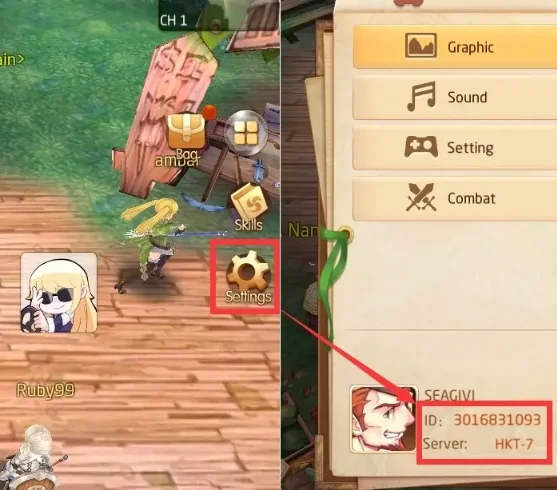
Find your Role ID:
- Log in to the game using your account.
- Open the game settings and locate your Role ID next to your avatar.
3
Complete the top-up:
- Enter your Role ID and character name during the purchase process.
- Proceed to checkout and confirm your payment method.
4
Receive Spirals:
- Stay logged in while the transaction is being processed.
- Spirals will be added to your account once the top-up is completed.


