Identity V Direct Top-Up Activation Guide
1
Echoes-Paket auswählen:
- Wähle aus den verfügbaren Optionen die Menge an Identity V Echoes aus, die du kaufen möchtest.
- Achte darauf, dass das ausgewählte Paket zu deinem Budget und deinen In-Game-Bedürfnissen passt.
2
User ID und Spielserver eingeben:
- Melde dich mit deinem Konto bei Identity V an.
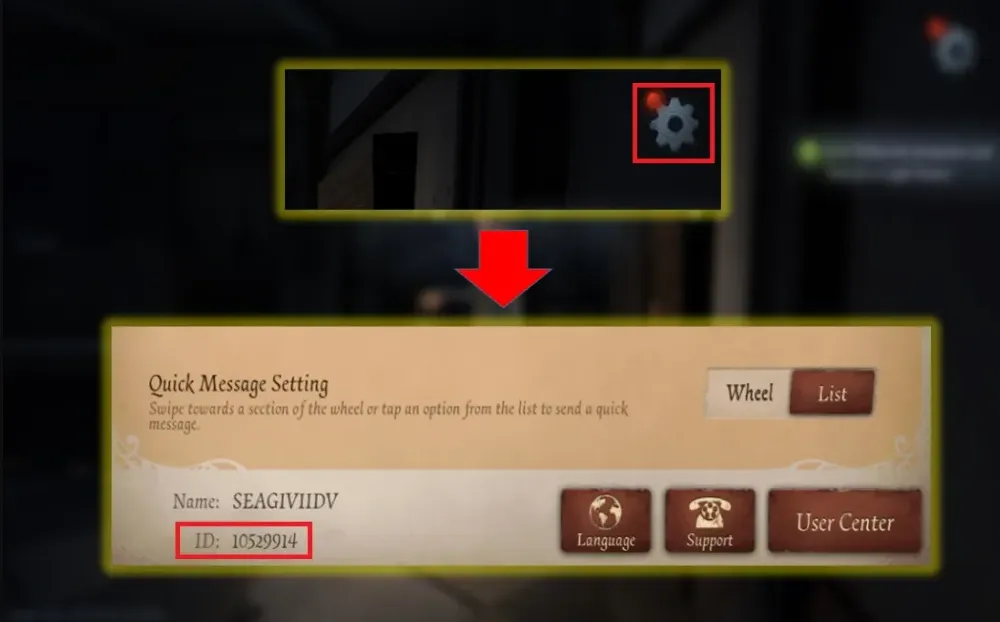
- Öffne das Einstellungen-Menü im Spiel.
- Finde im Bereich Games deine User ID und notiere deinen Spielserver. Gib anschließend beides exakt wie angezeigt in das Top-up-Formular ein.
- Stelle sicher, dass deine User ID und dein Benutzername korrekt sind, um Verzögerungen beim Erhalt der Echoes zu vermeiden.
3
Bestellung bestätigen und bezahlen:
- Gehe zum Checkout, nachdem du deine User ID und den Spielserver eingegeben hast.
- Wähle deine bevorzugte Zahlungsmethode aus den verfügbaren Optionen.
- Bestätige die Zahlung und warte, bis sie erfolgreich verarbeitet wurde; du kannst währenddessen im Spiel eingeloggt bleiben.
4
Echoes erhalten und prüfen:
- Nach Abschluss der Zahlung werden die gekauften Identity V Echoes in Kürze deinem Identity-V-Konto gutgeschrieben.
- Öffne das Spiel erneut oder aktualisiere es und prüfe dein Echoes-Guthaben, um zu bestätigen, dass sie angekommen sind.
- Falls die Echoes nach einiger Zeit nicht erscheinen, prüfe noch einmal, ob die richtige User ID und der richtige Spielserver verwendet wurden, und kontaktiere bei Bedarf den Support des Stores.